Digital Camera World Verdict
The Flashback One V2 is a charming disposable camera digital dupe. The screen-free retro shooting experience is mixed with an app for wireless transfers and swapping film-inspired presets. Images are filled with retro charm, including excellent colors, film-like noise, and sun flare. I didn't like that the viewfinder wasn't very accurate, and photos in bright sun often overexpose. Digital minimalists, be aware that the camera is app-heavy and requires connecting after taking 27 photos in order to shoot any more.
Pros
- +
Charming digital images with a retro feel
- +
Retro screen-free design
- +
Compact size
- +
Easy smartphone transfers
- +
Little shutter lag
- +
Affordable
Cons
- -
Inaccurate viewfinder
- -
Overexposes in bright sun / too close to flash
- -
Requires app after 27 photos to shoot more
Why you can trust Digital Camera World Our expert reviewers spend hours testing and comparing products and services so you can choose the best for you. Find out how we test.
Disposable film cameras have seen a resurgence in trends – but so have the number of people disappointed at seeing how much developing film actually costs. The Flashback One35 V2 has almost all of the retro disposable film vibes with none of the developing costs.
The Flashback One35 V2 is a screen-free digital camera that uses a traditional viewfinder, requires winding after each shot, and “loads” one of several digital “film” presets. Yet, the tech inside is a modern digital sensor, along with wireless capability to deliver those photos to a smartphone without cords.
Using a screen-free disposable camera dupe felt so liberating that I happily ignored my iPhone camera for more than a week and shot with the Flashback One35 V2 instead. I was rewarded with retro-styled photos that didn’t need any filters – and were still transferred right to my phone.
Flashback One35 V2 review: Specs
Resolution |
13MP |
Storage |
Built-in, 27 photos before "developing" |
Transfers |
USB-C, Wi-Fi |
Self-timer |
Yes |
Lens |
Fixed focus |
Flash |
Yes |
Dimensions |
4.2" × 2.1" × 1.2" / 10.7 x 5.3 x 3 cm |
App |
iOS / Android |
Flashback One35 V2: Price & Availability
The Flashback One35 V2 began shipping in February 2026.
The camera is sold largely through the company's online store. Retail availability is limited, but a handful of stores do sell the disposable dupe, including B&H in the US
The camera sells for about $119 / £85 / AU$160 / CA$170.
Flashback One35 V2 review: Design & Handling

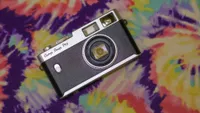
The Flashback One35 V2 is inspired by disposable film cameras, and that’s exactly the retro vibe that I got when holding the camera.
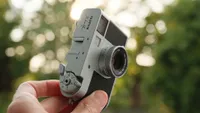
The Flashback One35 V2 is small – only about 1.2 inches / 30mm thick, and just over four inches / 106mm wide and two inches / 53mm tall. Despite the size, there is a small curve at the front for my fingers to wrap around – which is great because, as much as I love my childhood photos from the 90s, I’d rather not bring back the trend of getting my fingers caught in the edges of the snapshots. (Although I did manage to do this at least once.)

The Flashback camera is screen-free in the sense that there’s no way to preview your shots. The only screen-ish part of the camera is a small window at the top that tallies the number of shots remaining in the digital “roll.”

The feature that really sends home the feel of a disposable film camera, however, is the “film” winder that needs to be wound after every shot. Other than that, there’s just the shutter button and the flash’s auto-off switch, so the controls are straightforward.
Photos are snapped using a small but traditional optical viewfinder. This feature is essential to creating the feeling of a disposable camera, but like some disposables, the viewfinder isn’t very accurate. I regularly had things on the edges of the frame that I didn’t see in the viewfinder.

The Flashback One35 V2 is built with plastic, though it doesn’t feel terribly cheap. I tested one of the clear models, which feels a bit Y2K and had me exploring the camera to see where all the different electrical components are. I found it oddly satisfying to click the camera and watch the plastic piece shoot over to disable the shutter release until the winder is turned once more.
The shutter release feels solid, and I didn’t notice a significant delay between pressing the shutter and hearing the click signalling that the image was taken. Disposable dupes aren’t meant for action, but I didn’t find any annoying delays for taking single shots. Most notably, the “film” winder does seem to take a while to wind all the way around the whole dial in order to take the next shot.

Storage is built-in on the V2, so there’s no memory card slot – though with the cost of memory cards lately, I don’t think that’s a bad thing. The camera has somewhere around 2GB of memory, but it intentionally limits you to 27 shots for that disposable film feel. Once you transfer those photos to your phone, those images can be erased, and a new “roll” starts. New to the V2, it’s now also possible to transfer photos with a USB-C cord to a computer or smartphone.
Flashback One35 V2 review: The App

No, an “app” doesn’t feel much like a disposable camera, yet that’s where some of the old school vibes come in from. First, you have to load the “roll” of film, and so far, there are eight different options to choose from.
These digital filters try to mimic the look of real film. There’s “classic” mode, black-and-white, a teal cinema look, a warmer gold option, and one meant specifically to mimic the look of disposable film.
Each “roll” shoots 27 photos, then the camera needs to reconnect to the app to offload those photos to the “Lab.” In the original Flashback mode, those photos spend 24 hours at the lab, creating a delayed gratification much like waiting for film to develop.

But, Flashback has also introduced a “digicam mode”. This mode is still set to 27 shots, but you can unload your photos to the app early and see them after a few seconds of “developing” rather than a full 24 hours.
App setup and connectivity were rather seamless. There are three different ways to connect to offload photos – either through USB-C, a home Wi-Fi network, or the camera’s built-in network when traveling. The built-in W-Fi option needed to be retried occasionally. I found the cord the most reliable.

The mix of using the camera with the app feels both retro and modern at the same time. On the one hand, you can’t look at your photos right away. I felt like I was still in the moment with a camera that I took a snapshot with and then promptly put away.
But, on the other hand, there’s no option to change the film type or modes directly on the camera, and it’s a screen-free camera that relies heavily on a smartphone app. That’s fine if you want to stay in the moment and don’t mind opening your phone later on – in fact, it’s probably faster than offloading an SD card. (Or, at least it can be with the 24-hour delay turned off.) But if you’re looking for a camera for a kid who doesn’t have a smartphone or if you fall into the tech minimalist camp, be aware that there’s a heavy smartphone reliance.
FlashbackOne V2 review: Image Quality

The FlashbackOne V2 doesn’t just make you wait to see the photos; it reveals them slowly, shot-by-shot. The experience is far superior to taking a photo with my iPhone and never looking at it again.
The images coming from the FlashbackOne V2 are a happy blend between disposable film vibes and digital. The viewfinder isn’t 100 percent accurate; there are more than a few shots where I caught something on the edge of the frame that I couldn’t see as I took the photo. I can’t see what I’ve shot right away, so there’s still a bit of a surprise when I finally see the photos.

The film presets are a fantastic mix. The Flashback Classic has a bit of a film feel without going too overboard on wacky colors. I spent quite a bit of time with the Flashback Gold and loved the slightly warmer tones – though I could argue that even more warmth would be great. There’s, of course, a black-and-white mode, which has nice, punchy contrast.
The Flashback One35 V2 uses a cheap plastic lens, which is a big part of what makes the images look as if they were shot on disposable film. The edges are smudged while the center remains acceptably sharp – though like disposable film, there’s no close-up mode, so shots too close will be out of focus.

Directed towards the sun, the lens will create some gorgeous sun flares.
The sensor is an upgraded 13MP. I think that’s a nice happy medium of creating images that have enough detail without being so perfect that it no longer feels retro.

Several of my shots also had some noticeable grain, even outdoors in good light. Noise may be unwanted in modern cameras, but the imperfection feels welcome for cameras working to recreate that retro feel.
While the resolution feels plenty for a retro camera, the smaller sensor does create a limited dynamic range. Outdoors in the sun, several of my shots were regularly overexposed. (That’s photography speak for “too bright.”) My biggest disappointment was the occasional tendency to overexpose bright spots into white nothingness – something that’s common and nearly expected for the price point and category.

The camera has a built-in flash that adds to that retro feel indoors, creating the harsh shadows commonly associated with disposable film cameras. But, the flash isn’t always well balanced, and if you get too close, the photos will be blown out to almost white nothing-ness. Thankfully, there is a switch to turn the flash off or to use auto flash.
Overall, the photos coming from the Flashback One35 V2 had a near-perfect blend of capturing a retro feel from a modern digital sensor.


Flashback One35 V2 review: Verdict
The Flashback One35 V2 mixes the best of a 90s disposable film camera with the best tech from modern cameras. Taking photos is once again a screenless, simple experience that doesn’t pull me from the moment. Developing the photos is no longer an expensive process, yet it still has a slow reveal – and easy transfers to a smartphone for social sharing.

Retro cameras are intentionally imperfect. I loved the grain, retro colors, soft edges, and lens flares that snub crunchy modern smartphone photos. I was a bit disappointed when several of my outdoor shots were too bright, and the viewfinder isn’t very accurate – the two imperfections that I’d rather change than embrace.
But, considering the price, the Flashback One35 V2 is an excellent disposable film camera alternative with less waste and zero film developing costs – without completely giving up the retro charm.
The Flashback One V2 is available directly from Flashback as well as from a small number of retailers.
Flashback One35 V2 review: Alternatives