Digital Camera World Verdict
The Andoer L4 Pro autodolly doesn’t provide the fast and versatile camera moves that a gimbal can, but unlike a tripod-mounted gimbal you can make the L4 Pro track sideways or dolly forwards while you’re in the shot (whereas the tripod-mounted gimbal can only tilt and pan on the spot). The L4 Pro should appeal to stock videographers who want to add a bit of motion to static scenes, and it will be a perfect accessory for product photographers who need a smooth slow pan around a small subject on their desktop.
Reasons to buy
- +
Compact and lightweight
- +
Tracks, pans and dollies
- +
Adjustable speed
- +
Remote controlled
Reasons to avoid
- -
Requires a smooth surface
- -
Makes a slight motor noise
Why you can trust Digital Camera World Our expert reviewers spend hours testing and comparing products and services so you can choose the best for you. Find out how we test.
When I first started making videos for a living back in the late 80s, my video production team used two long, smooth pieces of wood as tracks for the wheeled ‘dolly’ that was attached to the base of our chunky video camera’s tripod. This enabled us to add smooth camera moves to shots, such as dollying forward towards an actor, or tracking (crabbing) left or right to add a bit of motion and life to a static scene. When not in use, we kept the two wooden tracks in a plastic body bag (I’m not sure where my video unit got that from!).
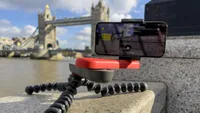
Fast forward to the 21st century, and I’ve just tested a descendant of my primitive 80s camera tracking system - the Andoer L4 Pro. This device is a small, battery-powered camera slider (or as it says in the manual - an ‘autodolly’) that can dolly, track, or pan the attached camera or smartphone - as long as you find a smooth, flat surface for it to drive on. Lots more about that limitation in the Performance section of this review.
Andoer produces a wide range of photographic equipment, from green screen backdrops to LEDs and soft boxes. They also produce a large range of affordable compact digital cameras, as well as larger camera dolly rail-based set-ups. Interestingly, I discovered that the Andoer L4 Pro is identical to a Neewer branded three-wheeled tracker - more on that in the Price section.

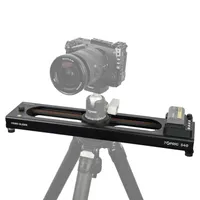
The Andoer L4 Pro isn’t the first electronic camera mover that I’ve tested for Digital Camera World. Back in 2022, I tested the Joby Swing - an electronic smartphone slider. The tripod-mounted Swing was very limited in the speed and distance that it could move the camera, whereas thanks to its three rubber-clad wheels, the Andoer L4 Pro can keep on tracking until it runs out of a surface (such as the end of a park bench!).
Some would argue that in the age of the camera gimbal a camera slider is a relatively inferior solution to making smooth moves. A gimbal enables you to pan, track and dolly your camera manually - adding motion to your footage. You can pop a gimbal on its mini tripod and use its AI tracker to tilt and pan the camera to follow your every move, or use its joystick to perform a smooth pan. So, why and when would you use a slider instead of a gimbal? Is a slider worth buying. The short answer is a firm ‘yes’, but I’ll clarify and unpack that answer later in this review.
Check out our guide to the best camera sliders.

Andoer L4 Pro: Specifications
Speeds |
1.4 cm/s, 2.4 cm/s, 3.0 cm/s |
Weight |
296g |
Dimensions |
3.8 x 10.6 x 3.8 cm |
Payload |
3kg / 6.6 lbs |
Material |
Plastic |
Remote Control Range |
6m / 19.7ft |
Battery life |
6 hours |
Connectivity |
1/4-inch and 3/8-inch tripod threads
|
Andoer L4 Pro: Price

The Andoer L4 Pro retails at £75.29 on the UK Amazon Store. You can see the Andoer L4 Pro. In the USA, this model is most easily found being sold under the Neewer brand for $73.89 on the Amazon US Store – but this doesn’t include a ball-head. The Neewer branded version of the tracker is also available on the UK Amazon store for £78.99.
On the UK Andoer store the Andoer L4 Pro is pictured wearing an Andoer branded ball-head camera mount, though the version that I tested didn’t include this rather useful ball-head accessory. I could pick up a compatible 1/4” thread ball head from Andoer for under a tenner. To attach my iPhone 17 Pro to the Andoer L4 Pro I used a Joby-branded smartphone holder that I already owned.
The Andoer L4 Pro won’t blow your budget, and even if you already own a gimbal, it could still come in handy when you want to capture a quick pan, tracking shot or dolly move without the faff of unpacking and setting up a large stabiliser. It could also be a useful tool for stock videographers, enabling them to add movement, life and energy to otherwise static scenes, such as landscapes where there is little action within the frame.
Andoer L4 Pro: Design & Handling

The Andoer L4 Pro autodolly is a compact, three-wheeled device that fits comfortably in the hand when folded. It also takes up very little space in a kit bag, which is a big plus for me as I prefer to travel light.
The specifications state that the autodolly is made from “high-quality plastic”, although it also contains several metal components. Its two folding legs (with wheels attached) are metal and are connected to a metal bracket that secures them to the rectangular plastic body. At the opposite end is a third wheel, which is the only motor-driven wheel. As it rotates, it propels the autodolly along on all three wheels. The metal components make the L4 Pro feel satisfyingly solid and heavy, though it still weighs in under 300g.
By adjusting the angle of the two hinged rear wheel legs, you can make the dolly travel in a straight line for a tracking or “crab” move, or follow a curved path to create a pan. The legs can be adjusted in increments to produce a tighter or wider curve, resulting in a faster or slower pan. Helpfully, each hinge is marked with a small protractor graphic, making it easy to set both legs to the same angle and achieve a smooth tracking move, pan or even a full rotation. Each of the three wheels has a rubber ‘tyre’ that enables them to have traction on a variety of surfaces.
On one side of the rectangular body you’ll find the on/off switch and a USB-C port for charging the internal battery. On the opposite side are two plastic buttons. One, helpfully labelled “Speed”, lets you cycle through three settings. The selected speed is indicated by one green light for 1.4cm/s, two lights for 2.4cm/s and three lights for 3.0cm/s. I’ll discuss speed in more detail in the Performance section, as there are ways to make the attached camera travel faster. There’s also a button that enables you to make the motorized wheel rotate the opposite way, so this lets you change the direction of travel. The motorized wheel does make a little whirr which can be picked up by a smartphone’s mic, but on the whole the whirr is negligible, as you’ll hear from see my supporting video.

Speaking of cameras, the top of the L4 Pro features both 1/4-inch and 3/8-inch mounting threads. The device also comes with a circular mounting attachment, so it was a simple matter to screw a smartphone holder onto it and clip my iPhone 17 Pro into place. You can also attach a compact or mirrorless camera to the Andoer L4 Pro, but as my colleague Chris George says in the best camera sliders buying guide - “While it’s definitely best suited to smaller cameras – it won’t take a C500 cine camera with a 70-200mm lens – you’ll still be able to get a mirrorless camera on it with a 50mm lens onboard if the need arises.”
The Andoer L4 Pro’s orange wheels and mounting attachment are remarkably similar in colour to the iPhone 17 Pro’s Cosmic Orange finish, making it an especially attractive accessory for owners of that model. The complementary colour scheme is entirely coincidental, however, as the L4 Pro has been on the market for several years.
Oh, one last design point to mention is the inclusion of a remote control unit. This small plastic unit is designed to let you toggle between the L4 Pro’s three speeds and change its direction from a distance of up to 6m. I confess that although the light on the remote showed that the battery was active, I couldn’t get it to control the L4, which did make testing it a bit trickier as you’ll see in the Performance section (and in the supporting video).
Andoer L4 Pro: Performance
Above: watch my video showing the Andoer L4 Pro in action in the City of London
To test the Andoer L4 Pro, I popped it and my iPhone 17 Pro into my McKinnon 8L Camera Sling bag and headed into the city to capture some photogenic clips. I occasionally shoot editorial-style footage to sell on stock video sites such as Storyblocks.com, so I was keen to see whether the L4 Pro was fast enough to add sufficient movement to my clips. A slight pan or tracking move is a great way to bring extra life to a shot, especially when there isn’t much movement happening within the frame. I only earn around $50-60 per month from my stock video clips but that’s a regular passive income from clips I’ve uploaded over the years.
To be honest, I wasn’t expecting too much from this autodolly, although its maximum speed of 3cm/s is at least a little faster than the snail-like 1cm/s pace of the Joby Swing slider. But the more I used it, the more impressed I became with it.
As you’ll see in this section’s supporting video (above), my first test location was a scenic city park. This immediately presented a challenge: finding a surface that was sufficiently flat and smooth for the L4 Pro’s small, rubber-clad wheels to move freely.
I placed the L4 Pro on a park bench, adjusted the two hinged legs so that their wheels ran parallel with the motorized wheel, and flipped the power switch to On. I couldn’t get the supplied remote control to communicate with the L4 Pro, but it was a simple matter to press the direction button on the L4 Pro itself to set it in motion, having first started recording on the dolly-mounted iPhone 17 Pro.
When the L4 was travelling in a straight line, I didn’t notice much difference between the first and third speed settings, so I generally left it at its maximum speed of 3cm/s, as indicated by three green lights. I then walked into shot and admired the Art Deco building in the distance while the autodolly carried my iPhone through a tracking move.

Because I was looking towards the building, I was slightly concerned that the autodolly might roll off the end of the bench behind me and fall to the ground, so I kept each take relatively short. One of the L4 Pro’s wheels also had a tendency to drop into the gaps between the bench’s wooden slats, causing a small bump in the footage. This resulted in a few retakes and, as you’ll see in the supporting video, the camera movement in my first test clip was subtle because of the distance between the autodolly and the subject.
As I discovered when using the Joby Swing, camera movement becomes more noticeable when you place an object close to the lens. A nearby foreground object appears to move across the frame more quickly than subjects in the distance, creating a stronger sense of motion.
By positioning a bollard between myself and the iPhone 17 Pro mounted on the Andoer L4 Pro, I was able to capture a much more noticeable tracking effect. I then angled the two hinged legs slightly so that the device travelled in a gentle curve. This enabled me to track past a foreground railing and reveal the Art Deco building in the background with a more cinematic camera move, as you can see in the supporting video.
This is the kind of movement I couldn’t easily capture while filming myself with a gimbal. A gimbal can pan and tilt to follow me as I walk through the frame, but when mounted on mini tripod legs it remains in a fixed position. The Andoer L4 Pro, by contrast, physically travels across the ground, enabling a different and more dynamic type of tracking shot.
My third test location was the Barbican Centre, with its towering Brutalist architecture. Unfortunately, it wasn’t especially friendly terrain for the Andoer L4 Pro’s small rubber wheels, as almost every available surface was heavily textured. The floors were covered in chunky tiles, while the broad tops of the walkway walls were clad in rough, pebble-dashed concrete.
After some wandering, I eventually found a flat metal air-duct cover that was smooth enough for the L4 Pro’s small rubber wheels to traverse. I tilted my Joby smartphone mount upwards, switched the iPhone 17 Pro to its ultra-wide camera and angled the adjustable wheels to create a tight curve. This enabled me to capture a dramatic, low-angle circular move past the Barbican’s tall towers, while long plant stems swept more quickly through the foreground and enhanced the sense of motion.
While wandering through London, I enjoyed being able to quickly pull out the Andoer L4 Pro whenever I spotted an opportunity to add movement to a short stock video clip. I particularly enjoyed using it at the top of the Sky Garden, which offers panoramic views across London. By angling the L4 Pro’s two unmotorized wheels closer together, I made the device travel in a tight, fast circle. With the smartphone mount tilted upwards, this enabled me to capture dramatic and slightly dizzying low-angle footage of the building’s curved glass roof. I must thank fellow photographer Shaughn Malcom for filming me setting up and using the Andoer L4 Pro for this review’s supping video
Finally, I found myself on the banks of the Thames, where I wanted to capture tracking shots that followed the movement of passing boats — an ideal subject for stock video. However, as the Andoer L4 Pro trundled across the rough, gritty surface I had placed it on, I could see in the iPhone’s viewfinder that the footage looked rather bumpy. To my surprise, however, the recorded footage played back remarkably smoothly. This was thanks to the iPhone 17 Pro’s combination of electronic stabilisation and sensor-shift optical image stabilisation, which physically moves the sensor to compensate for camera shake. This gave me the freedom to use the L4 Pro on surfaces that weren’t perfectly smooth, greatly increasing the number of locations in which it could be used. Check out the supporting video to see the results for yourself.
Andoer L4 Pro: Verdict

I initially approached the task of reviewing the Andoer L4 Pro as something of a chore, as I couldn’t see how it would add much to my smartphone footage. However, within half an hour of testing, I began to appreciate its potential for bringing stock-footage subjects to life. It works particularly well when you compose a shot with objects in the foreground, as these move more noticeably across the frame and create a stronger sense of motion.
I can also recommend the Andoer L4 Pro to smartphone filmmakers who want to add a gentle tracking or panning movement to a shot. On the downside, it is dependent on a reasonably smooth surface if you want to produce a smooth track, dolly move or pan. Even so, I was pleasantly surprised by how well I could use it on slightly uneven surfaces, with the iPhone 17 Pro’s stabilisation ironing out the resulting bumps and wobbles during my test.
For smartphone filmmakers, the Andoer L4 Pro could prove to be a handy and affordable accessory - and it looks particularly smart when paired with the similarly coloured Cosmic Orange iPhone 17 Pro. In fact, it is such an eye-catching little device that two people stopped to chat to me while I was testing it, so hello to you chaps if you’re reading this!
Features ★★★☆☆ |
Button to choose between three tracking speeds and reverse button to change direction. Remote control unit. |
Design ★★★★★ |
Hinges on wheels enable you to adjust the movement of the Andoer L4 Pro so that it will track, can, pan or rotate on the spot. Two different threads make it easy to attach various camera mounts. |
Performance ★★★★☆ |
Ideally the Andoer L4 Pro needs a smooth flat surface to run on, limiting your compositional choices. The three speed settings aren’t vastly different. But it can add visual variety to clips. |
Value ★★★★☆ |
This is relatively affordable, and its so small that you may as well keep it in your kit bag until the right video opportunity arises. |
Overall |
★★★★☆ |
Alternatives