

Digital Camera World Verdict
This compact wireless mic with on-board storage is as much as almost any of us will need; flexible to the point you can change the appearance of the mic, light enough that it won't tug on clothing. After testing, the quality matches up, so I can't help but worry for the more 'professional' products in the range.
Reasons to buy
- +
Very compact and lightweight TX (mic)
- +
Replaceable cover system is simple and fast
- +
Records in 32-bit float, or up to 28h of 24-bit
- +
AI Noise cancellation
Reasons to avoid
- -
RX feels a tiny bit plasticky
- -
Replaceable covers a little fiddly until you're used to them
Why you can trust Digital Camera World Our expert reviewers spend hours testing and comparing products and services so you can choose the best for you. Find out how we test.
This new Mic Mini 2S – aimed at content creators using phones, serious cameras, and DJI products – steps into an already respected range and ups the game.
Instead of choosing from a simple wireless mic to send sound to your device (via a receiver, built-in or plug-in) or a high-end mic with a premium receiver, DJI seems to be doing two things at once.
The Mic Mini 2S retains most of the styling of the cheaper Mini but brings the ability to record on board – hence the 'S' in the name, meaning storage.
There is a compromise, of course (or the premium line would be in trouble), but it's not that significant – essentially the RX (Receiver) isn't as sophisticated, with no levels monitors and the like.
These days, though, 'less sophisticated' still means the ability to handle up to four channels at once, so this looks a promising option for many creators. I've put this through its paces for some video recording, and even a podcast, and here is my verdict.

DJI Mic Mini 2S: Price
The asking price for the Mic Mini 2S unit I tested – with 2 TX (mics) and 1 RX (receiver), as well as the charging case is a not insignificant £169, but £59 will buy you a single 2S TX (mic), and £79 a bundle with a 1 TX and 1 RX which can plug into a phone (or more or less any suitable USB-C device.
DJI Mic Mini 2S: Specs
Weight |
12g + clip / magnet |
Protocol |
Bluetooth 6 |
Record time |
28h |
Battery life |
11h |
Charge time |
70 mins |
Size |
28.1×28×13.5 mm |
Range |
400m (wth RX) |
DJI Mic Mini 2S: Build and handling
I tested the Mic Mini 2S 2 TX + 1 RX + Charging Case bundle, which gave me access to the full feature set. It's not the first time I've used devices from the DJI Mic series (as folk who have seen some of my video reviews will attest), so I'm familiar with them, but I don't think it'd take anyone long to master the basics.
There are two buttons on the side of each TX (mic), and they engage the power and can be used to start and stop recording. They're also used for pairing.
The correct button presses can be used to set the mic up to begin recording automatically when it connects to the RX to prevent forgetting, and the mic will record on a loop, so the last 28 hours are stored.

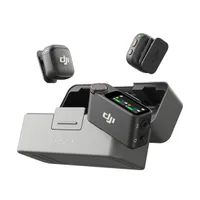
DJI's color caps – which clip on magnetically – are a significant addition to this series of mics, which is otherwise a rather chic translucent white. There is the tiniest of recesses at the baser of the mic to unclip the microphone afterward.

I found popping the color caps on very easy – the magnets (which you see as dots) easily hook onto a draw the cover into just the right place. Taking it off was not quite as easy because there is only a small recess at the bottom.
This is, of course, ideal (you don't want the thing just being knocked off), but it feels a little fiddly at first.
The full kit comes with a nicely weighted box that has a sprung hinge, a USB-C port on the rear for both charging and file transfer, and 4 lights to indicate the level of charge.
Inside it, there are two mics (though you can connect up to four), and the RX. This has a single plastic dial to increase or decrease the levels by one or two steps either way – a handy solution so long as the device you're connected to provides levels feedback (there is none on the RX or the TX).
The case also has room for the clips / magnets for the mics and the cables, which was not the case for the previous edition. A nice pro touch. If you pop the mics back in the case after use, and don't go more than about 10 hours at a time (and that is a long time), then you should have 40 hours of recording time before topping up your charge.
The RX in the box version of the kit has an interchangeable shoe that can either be a USB-C or fit a camera's shoe mount with a cable to a mic socket.
There is also the option of a smaller RX for phones with only a USB-C; this is in the same fetching translucent plastic that the mic is in (though for obvious reasons there is no color changing option!)

DJI Mic Mini 2S: Performance
I was thoroughly impressed with the audio quality, which is clean and clear.
I was also impressed that the RX works just as easily with a Mac's USB-C socket as with the phone. The Mics can connect to DJI's assorted Osmo devices without the need for a separate RX, too.
If found that the system handled background noise with aplomb, though I would always suggest using that feature with caution if you can, not because it isn't good, but why risk it?
If I had to find an irritation, it'd be the file-naming convention. The system records files of around 250MB before moving on, so if you record for over that time, as my wife and I did for the test, then you'll end up with multiple files.
In our circumstances – we were sending the files as a safety track – a more simple file numbering system would have been a bit easier.

DJI Mic Mini 2S: Overall verdict
The Mic Mini 2S is an excellent device, with more than a day's power available and simple options.
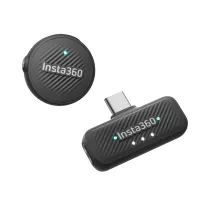
The most obvious competitor if you're into your action camera brands is probably the Insta360 Mic Air – which is even lighter, but a little less discreet (and doesn't offer color covers).
Perhaps, though, of wireless microphones, the Rode Go Gen 3 is the more obvious competitor. I've seen it offered in colors other than the traditional black (pink, in fact) and it has monitors on the RX. It does cost more, and lacks noise reduction, however, and the TX (mics) are undeniably bulkier.
If color is important to you, then Insta360's Pro option might be a more interesting alternative, with a built-in eInk display you can add your own logo rather than just a different color around DJI's.
So, in terms of sound quality, simplicity, and practicality, this is a refined device which looks and feels great, doesn't pull on the clothing, and seems to have the competition (especially in its price bracket) soundly beaten. The only slight letdown to my mind is the build quality of the RX, which just felt a bit 'cheap', partly because it's lightweight, I imagine.
Features |
With the arrival of on-mic storage, and the ability to record 32-bit float, as well as the in-case charging and simple USB-C transfer it's hard to imagine anything more functional. |
Design |
Taking a star off here seems cruel given the cleverness of the magnetic covers, but the RX could feel a little nicer in the hand. |
Performance |
Microphone quality is hard-to-fault, and in all my testing the receiver didn't drop out once (admittedly never more than a few meters from the camera). |
Value |
With most of the features of DJI's own Mic 3 Pro (save for the levels monitor), for significantly less cash, I can't help but see this as a high value proposition for nearly all creators. |
Alternatives
How I tested the DJI Mic Mini 2S
I tested the Mic Mini 2S over a few weeks, recording speaking and singing voices and recording devices. I connected to a Sony A7 III, an iPhone 17 Pro Max, a MacBook Pro, and a DJI Osmo Pocket 4.
In my experience, DJI keeps an eye on any issues and reliably offer firmware updates following the release.

