Digital Camera World Verdict
The Godox ML150Bi packs plenty of power for illuminating models in bright daylight, while also serving as an effective key light in darker locations. Its wide color-temperature range lets you complement the available light or summon a golden-hour glow in gloomy urban shadows. I particularly enjoyed using it to add rim and fill lighting during my test shoot, giving my location portraits a polished, studio-quality look. And thanks to its V-mount adapter, you can operate it without needing to use the supplied mains power unit when you need to shoot freely on location.
Pros
- +
Compact and portable
- +
Multiple ways to power it
- +
Control via smartphone app
- +
Very bright 150W output
Cons
- -
Doesn’t ship with ML-BA dockable battery
Why you can trust Digital Camera World Our expert reviewers spend hours testing and comparing products and services so you can choose the best for you. Find out how we test.
The Godox ML series consists of a series of modular continuous LEDs. I use the term modular because you can attach a range of accessories to them, such as magnetically attached diffusers or a twist-and-lock ML-CS1625 soft tent (which is basically a little soft box). You can also power them wirelessly using a clip-on Godox ML-BA battery, or use the ML150Bi’s supplied ML-VMA battery plate to attach Godox or third-party V-mount batteries to the LED.
The Godox ML range starts off in terms of affordability and power with the palm-sized ML-40Bi. At the top of the ML range, we have the Godox ML150Bi. This is the bigger brother to the similarly specced Godox ML80Bi, a key difference being that the ML150Bi produces a much brighter continuous light source for photographers and videographers to enjoy, even in the brightest of outdoor locations.
Both the ML80Bi and the ML150Bi ship with an ML-Z Zoom Reflector, so when this accessory is set to spotlight, the ML80Bi can emit 29,600 lux. On the same reflector setting, the ML150Bi produces 61,054 lux. Time for your model to put on some shades!

The term "Bi" pops up a lot in this introduction. The entire ML series consists of bi-color lights, meaning that they can emit a range of light color temperatures in degrees Kelvin. The ML150Bi can be adjusted – via button rotation or a swipe of a slider in the Godox Light smartphone app – to emit light that has a color temperature between a warm 2800K and a much cooler 6500K.
Being able to control the LED’s color temperature means that you can complement existing light sources, such as dialing in a cool daylight temperature of 5600K to add fill light that’s compatible with the location’s natural outdoor key light.
If you need a more colorful light source (such as purples, greens, and reds), then you need to look for an RGB LED, not a bi-color one. I can recommend the Neewer HB80C for both creative color and Kelvin scale illumination, among other continuous LED options in our buying guide to the best video lights.

Godox ML150Bi: Specifications
Color temperature range |
2800K–6500K |
Maximum luminous flux |
61,054 lux at 3.3 ft [1m] (with ML-Z reflector) |
Main material |
Plastic |
Weight of LED |
≈1.70 lb [770g] |
Color Rendering Index |
CRI≥96, TLCI≥96 |
Output |
150W |
Dimensions of LED |
≈3.58″ × 4.53″ × 3.58″ |
Battery Life |
45 minutes with V-Mount Battery |
Video lighting effects |
11 animated lighting effects |
Bluetooth control range |
98 ft [30m] |
Godox ML150Bi: Price
The Godox ML150Bi retails at $259/£229. Its weaker little brother, the ML80Bi, retails at $229/£203. So for only around $30/£30 extra, you can purchase a more powerful 150W LED (compared to the weaker 80W device). So on paper, it seems like a no-brainer to go for maximum power for an extra $30.
However, I do have a word of caution. The cheaper ML80Bi ships with a dockable ML-BA battery that matches the white design of the lamp. The more expensive ML150Bi doesn’t ship with the ML-BA battery, so you’ll need to power the ML150Bi by its supplied mains cable or use its supplied ML-VMA battery plate to attach a V-mount battery (not supplied). You can buy an ML-BA battery to power the ML150Bi, but that will add another $89/£73 to your costs.
Personally, I like the fact that you can power up the cheaper ML80Bi out of the box thanks to its supplied battery (after charging it via its USB-C cable). I did have a V-mount battery to attach to the ML150Bi’s adapter plate, so that was fine for my test, but bear this powering issue in mind when considering a purchase.
Godox ML150Bi: Design & Handling
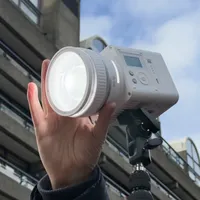
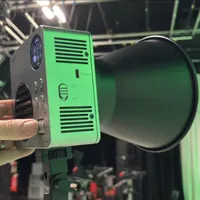
After unboxing the Godox ML150Bi, it looks like an elongated version of the Godox ML80Bi, with the same distinctive plastic white body material. The bigger ML150Bi features extra grilles and ventilation holes to help dissipate the extra heat that its 150W produces (plus an internal fan is on hand to keep the lamp cool). As with its little brother, the ML150Bi has an identical control panel that has an On/Off button and a Mode button to jump between controlling color temperatures in CCT Mode or choosing animated lighting effects in FX Mode.
A ridged plastic control wheel enables you to scroll through various menu items or adjust the frequency of lighting flashes, for example, and a central Set button lets you commit to your desired settings. A little OLED screen tells you all you need to know about the properties of the currently selected mode, and you can use that to activate Bluetooth, which enables you to control every setting via the Godox Light smartphone app.

The control dial/button (or the Godox Light app) enables you to adjust color temperature between a range of a warm 2800K to a cooler 6500K, so you can mimic candlelight, a sunset, or average daylight with ease. There are also 11 animated lighting effects – Lightning, Flash, Cloudy, Broken Bulb, TV, Candle, Fire, Fireworks, Explosion, Welding, and SOS.
As it’s a bi-color light, the lighting effects can use a mix of warm and cold color temperatures – such as creating cold flashes of lightning using a color temperature of 5400K, or a flickering fire at 2800K. If you want to mimic the flashing blues and reds of an off-screen police car, then you’ll need an RGB-capable LED such as the Neewer HB80C (which has 18 lighting effects, compared to the 11 from the ML150Bi).

The rear of the ML150Bi is initially hidden by a white plastic panel. At first, it was a bit of a challenge discovering how to remove the panel, but all you need to do is slide it up. Behind the panel are docking clamps that enable you to connect the LED’s body to a Godox ML-BA battery (not supplied). Fortunately, the kit does ship with the Godox ML-VMA battery plate, so I was able to pop a Neewer PS099F V-mount battery onto the plate and power the light during my test shoot.
Also included in the sturdy carry case that ships with the ML150Bi is an ML-Z Zoom Reflector. This mounts onto the front of the LED and can be rotated to create a wider or narrower (and more intense) beam of light. The front of the reflector is magnetic, enabling you to easily attach diffusers to subtly change the light’s properties. The Godox ML-D diffusers (sold separately) are designed to pop straight into the reflector. I found the diffusers to be a bit too subtle when out in a busy city location, but they may be more attractive (and more noticeable) if you’re shooting in a studio against a plain backdrop.


Godox ML150Bi: Performance
Since the ML150Bi didn’t ship with a battery, I popped on its supplied adapter and slid a Neewer PS099F V-mount battery I already had onto it. The Neewer battery’s display informed me that it was 80% charged, so I thought that would be more than enough power for a one-hour test shoot with Maddy, the model.
The ML150Bi’s sturdy black and branded carry case fitted nicely into my Gomatic 25L Camera Backpack, alongside a variety of accessories such as mini tripods, a Hohem iSteady V3 Ultra gimbal (to record my intro for the video review), and a spare iPhone 17 to capture some B-roll clips for my video review. The Neewer V-mount battery fitted in there too, so I found the backpack quite heavy to carry as I wandered through London to my shooting location – the Barbican Centre.
I’d previously tested the smaller Godox ML80Bi on a model portrait shoot in the Barbican Centre, so I decided to repeat the shoot with the ML150Bi. The weaker ML80Bi needed a Fresnel lens attachment to boost the light when shooting outdoors. The more powerful ML150Bi did not!

I started by using the bright sun as a key light, but this plunged parts of my model’s face into harsh, contrasting shadows. I was then able to position the ML150Bi on a lighting tripod to fill in the harsh shadows with a complementary daylight color temperature. I also enjoyed placing the LED behind the model to create a rim light that helped her stand out from the background. This extra light source helped "sculpt" her face with a key, fill, or rim light, giving it a more interesting three-dimensional look.
To make the ML150Bi’s light a little less harsh, I removed the reflector and slotted the Godox ML-CS1625 Soft Tent onto the LED, courtesy of the soft box’s supplied Godox mount adapter. The soft box reduced the intensity of the LED, so I needed to place the light in the shot while I snapped portraits for this review with my iPhone 17. It was an easy job to paint out the light stand and its shadow using Photoshop’s Generative Fill tool, so I was happy to keep the light in the shot when capturing wide shots of the model. For tighter portraits, I was able to keep the ML150Bi out of the shot.
I then moved into the shadow of the tall Barbican towers, which had a cooler, darker, and flatter lighting that was no good for portrait photography. Fortunately, after adjusting the LED via its tactile switches and dials, I was able to summon a strong golden-hour sun to be a key light in the gloom. This enabled me to capture some attractive sunset portraits (and slow-motion video of the model’s hair being backlit by the "sun").
Finally, I headed to a darker shaded area and used the ML150Bi as a harsh key light to capture film noir-style portraits with stark shadows. I also experimented with using some of the lighting effects while shooting video on the iPhone 17. The Broken Bulb effect in particular worked well with the grungy mise en scène of the urban environment, so these lighting effects should make the ML150Bi appeal to video creators as well as portrait shooters.
My hour-long shoot took place in four different locations that were relatively close together, so the light was on more than it was off! Given my V-mount battery started at 80% charge, I was lucky to have around 4% of power left at the end of my shoot, so I’d certainly recommend taking a spare battery along with you, especially due to the 150W power of the Godox ML150Bi.
I have one little niggle regarding the performance of the Godox ML150Bi. I turned the LED off between the various location setups to save battery power. To turn it on, you need to press the power button. A little icon appears on the OLED screen indicating that you then need to rotate the plastic dial in a clockwise direction to activate the LED. Sometimes this operation didn’t work, so I needed to press the power button again and have another go at rotating the dial. This did slow me down a little.
Oh, there was also a little bright orange rubber stopper that fitted onto the end of the metal lever that releases objects mounted to the front of the LED, such as the supplied reflector. This rubber stopper kept dropping off and, as I expected, it got lost during the shoot. However, it doesn’t affect the performance of the light in any way, so it is negligible, but I do like to be thorough in my reviews.
Godox ML150Bi: Verdict
I enjoyed using the Godox ML150Bi during my model portrait test shoot. As it was considerably more powerful than the ML80Bi, I could travel lighter without needing the brightness-boosting Fresnel lens that the ML80Bi required when shooting outdoors. However, I missed the Godox ML-BA battery that is supplied with the ML80Bi. My Neewer V-mount battery powered the ML150Bi throughout the shoot, but its bulky black casing looked out of place against the LED’s white body. Godox’s white ML-BA battery blends much more neatly with the white plastic bodies of its ML series LEDs, although buying one to power the ML150Bi would cost an additional $89/£73.
All in all, the Godox ML150Bi deserves a place in your kit bag as it elevates portraits from good to great. You can fill in harsh shadows or add a key light that accentuates the shape of your model’s face. Videographers might find the animated effects useful for adding drama, but the lack of RGB lighting effects (such as Squad Car) means that the effects from this bi-color light are less useful.
Features ★★★★☆ |
Controllable via a built-in button/dial combination or via the Godox Light smartphone app. Emits a range of colors in degrees Kelvin between 2800K–6500K, but lacks the extra colors produced by an RGB LED. |
Design ★★★★☆ |
The modular system enables the lamp to be compact and portable, and compatible with a host of Godox accessories. However, the lack of a supplied Godox ML-BA battery loses it a star. |
Performance ★★★★☆ |
The Godox ML150Bi was more than powerful enough to stand in for the sun, though an 80% charged third-party V-mount battery lasted around 45 minutes due to the light’s 150W power demands. |
Value ★★★★☆ |
There are cheaper LEDs on the market (such as the ML80Bi), but for the M150Bi enables you to add studio lighting to any location for a reasonable outlay, especially if you add a separately sold Godox Soft Tent. |
Alternatives