Digital Camera World Verdict
The 3 Legged Thing AirHed Cine CC suits me to a tee. I major on stills but, like most photographers nowadays, often like to shoot video as well. I’m not keen on carrying two specialist tripods around, so the best thing about this head, as far as I’m concerned, is that it gives the necessary fluid motion for shooting video, but in a relatively compact and lightweight design that’s easy to pop onto a regular set of tripod legs, so I can mix and match heads for the task at hand. The fact that it improves on the original design while still being very competitively priced seals the deal.
Pros
- +
Smooth, fluid movement
- +
Compact but tough
- +
New extending panning arm
- +
New rotating clamp and QR plate
Cons
- -
No counterbalance adjustment
- -
No secondary panning mechanism
Why you can trust Digital Camera World Our expert reviewers spend hours testing and comparing products and services so you can choose the best for you. Find out how we test.
It’s been two and a half years since I reviewed the original 3 Legged Thing AirHed Cine, and I was very impressed at the time. It was everything I’d come to expect from the company behind it – an innovative design that packs an array of useful features, with excellent build quality and an impeccable finish.
Enough said? Well, while I’ve been steadily adding to my personal collection of 3 Legged Thing photo and video equipment over the years, the new and improved AirHed Cine CC is destined for a place on my shopping list, with its ability to turn pretty much any set of legs into one of the best video tripods. It certainly looks and feels right at home on my prized 3 Legged Thing Winston 2.0 sturdy carbon tripod.

3 Legged Thing AirHed Cine CC: Specifications
Tilt range |
165 degrees (90 forward, 75 back) |
Panning range |
360 degrees |
Maximum payload |
10kg / 22lb |
Base diameter |
60mm / 2.36" |
QR plate |
Arca-Swiss 100mm / 3.94" |
Dimensions (LWH) |
24x11x10cm / 9.4x4.3x3.9" |
Weight |
690g / 1.5lb |
3 Legged Thing AirHed Cine CC: Price
Specialist video heads are often big, heavy, unwieldy, and very expensive to buy. The 3 Legged Thing AirHed Cine CC is ideal in my books (and those of my accountant), in that it’s relatively compact, lightweight, and reasonably priced, at $249 / £229 / AU$799. Considering the feature set and quality of construction, it’s a bit of a bargain.
3 Legged Thing AirHed Cine CC: Design & Handling
I didn’t find much of anything wrong with the original version of the 3 Legged Thing AirHed Cine fluid, video head, but the updated ‘CC’ adds some neat new tricks. Let’s not get ahead of ourselves, though, and start with the basics. The head is designed primarily with videography in mind, but it works just fine for shooting stills as well, especially if panning is the name of the game for tracking sports or wildlife subjects. It’s also a good fit for a large spotting scope.
A key feature of any video head is that it enables smooth pan and tilt movements, and, just like the original, the CC has a lovely fluid feel to it, based on a quality design and spring-loaded counterbalance mechanism. That said, the counterbalance is not adjustable to accommodate different sizes and weights of camera, but the omission is what I’d expect from a relatively compact, lightweight, and affordable video head, such as this one.

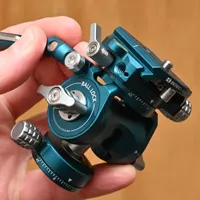
Crucial to panning and tilting is the panning handle itself, as your primary point of physical contact with the head. The handle is completely revamped in the new version, the main difference being that it has a retractable design. Not only does it enable you to choose the length that feels most comfortable and natural in use, but it also makes it less likely that you’ll need to remove it and stash it separately when stowing the head. The images above and below show the panning handle in its retracted and fully extended states.

True to type, the panning handle is mounted on splines, which enable a wide range of rotational adjustment as well as ensuring a secure fitment that avoids any slippage or wobbling. The arm release knob can be pulled out and rotated on a six-sided head to ensure it doesn’t stick out in the wrong direction and get in the way when fastened.

Also, as I’d hope for in a video head, the panning handle can be attached to the left or right side, catering not only to left-handed and right-handed users but also to individual preference. Some right-handers will prefer to use the panning handle with their left hand, to leave their right hand free for operating the mounted camera.

At the center of the left side of the head is the main tilt-action lock and release knob. It operates with smooth simplicity and can lock off the tilt very securely for fixed position shooting. Only minimal turning is required to lock or release the head’s tilt mechanism. A generous 165 degrees of tilt is on offer, from 90 degrees forward to 75 degrees backward.

Above and to the front of the tilt knob on the side of the head is a mounting socket with a standard 1/4-inch thread. You can use this to attach accessories like a microphone, LED lamp, or video monitor. 3 Legged Thing offers two sizes of optional ‘Pivot Magic Arms’ for the task.

Down at the bottom of the left-hand side is the panning lock/release knob. Like the release knob for the panning handle, this one is spring-loaded and sits on a six-sided head, so you can pull it out and rotate it to your preferred position. Loosening the lever enables a full 360-degree panning rotation. To help keep tabs on movement, there’s a 360-degree scale on the base, numbered in 15-degree intervals and marked with lines at smaller 2.5-degree increments.

To help with leveling your tripod legs, which in turn helps to ensure that everything stays on the level when you’re panning, there’s a bubble level built into the lower section of the head. A secondary bubble level is fitted to the main clamp at the top, for assistance with leveling the tilt mechanism.

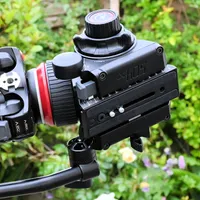
Another upgrade over the original version of the head is that the clamp up on top can be removed by undoing four hex screws, and rotated laterally through 90-degree intervals. The bonus here is that you can change the orientation of the QR plate from running front-to-back to side-to-side. This can be a big advantage if you’re using a camera with an L-bracket or a cage.

The Arca-Swiss compatible quick-release plate is also redesigned. For starters, it’s longer at 100mm instead of 90mm, giving more scope for centering the weight of your camera on the head. It also features a sliding camera screw sled and spring-loaded locator pin, plus a cable management hook at the front. The QR plate also adds compatibility for 3 Legged Thing’s growing range of ‘Xpand’ accessories, cheese plates, and risers, and features multiple 1/4-inch and 3/8-inch threaded screw holes.

The images above and below show the top and bottom of the ‘XP 100 Ultra Plate’, 3 Legged Thing’s redesigned Arca-Swiss compatible quick-release plate that’s supplied with the head.

Last but not least, the head is supplied complete with 3 Legged Thing’s handy ‘Toolz’ multi-tool, which features hex keys, a flat-blade coin key, a keyring clip, and a carabiner for attaching it to whatever you see fit. It even works as a bottle opener if things get really tough.

3 Legged Thing AirHed Cine CC: Performance
I’m impressed that despite having a compact size and weighing in at just 690g / 1.5lb, the AirHed Cine CC has a beefy maximum payload rating of 10kg / 22lb. As I’ve mentioned, it doesn’t feature an adjustable counterbalance system, but I found it worked well with everything from small, lightweight cameras to big, hefty outfits comprising large camera bodies with super-telephoto lenses.

Any video head lives or dies by the smoothness of its pan and tilt mechanisms, and the AirHed Cine CC has a really nice fluid feel to it. The new extending panning handle is a joy to use, and all the controls feel smooth, precise, and intuitive. Suffice it to say, you can devote your entire attention to shooting rather than wrestling with the head to get what you want out of it.

It can be a bit tricky to level the legs of your tripod, which can be essential to ensure your camera stays on the level during panning. One elegant solution is to add a 3 Legged Thing LevelHed Levelling Base into the mix, but it’s pretty pricey at an additional $140 / £130 / AU$259. Something I’ve seen in some video and hybrid heads, like the Benro FS20PRO Video & Foto Head, is a secondary panning plate on top of the head, which enables you to just level the head for panning rather than the legs or a leveling base as well, but this is omitted in the AirHed Cine CC.
3 Legged Thing AirHed Cine CC: Verdict
The 3 Legged Thing AirHed Cine CC is a great fit for me and my gear. It’s conveniently compact and lightweight, so I can stash it away in my photo backpack and grab it whenever I need to swap from shooting stills to video. It actually works really well as a pan-and-tilt head for shooting stills in addition to video, especially if you add in an L-bracket for portrait orientation shots. The laterally rotatable clamp makes the new CC version of the head all the more ideal for this, as you can use the QR plate or slot in an Arca-Swiss compatible L-bracket running sideways instead of just front-to-back.
I also like the redesigned, retractable panning handle, as it enables me to select the length that I want to use, as well as saving on storage space without feeling the need to remove the handle every time I pack the head away. The tricked-up replacement ‘XP 100 Ultra Plate’ is yet another improvement, and I like the way that I don’t even have to use the QR plate at all if I’m shooting with big, heavy telephoto lenses that have an Arca-Swiss profile mounting foot in their tripod mounting collars. All in all, the ‘CC’ is a worthy upgrade over the original. With its clever design, rich feature list, excellent build quality, and stylish finish, this one’s a keeper.
Features ★★★★½ |
The original AirHed Cine had an impressive feature list but the CC adds a rotatable clamp, retractable panning handle and an upgraded ‘XP 100 Ultra Plate’. |
Design ★★★★½ |
The design combines compactness and lightness of weight with a hefty payload rating and excellent build quality, along with intuitive ease of use. |
Performance ★★★★½ |
There’s no adjustable counterbalance system nor a secondary upper panning plate but the head performs brilliantly well and has a wonderfully fluid feel to its tilt and pan mechanisms. |
Value ★★★★½ |
In no way is this a ‘cheap’ video head but considering the features, design and performance, it’s great value for money. |

Alternatives