
With the best lavalier microphone (also known as a lav mic, lapel mic, or tie-clip mic), you can significantly improve the audio quality in your videos – often without spending very much at all! Clipping (or magnetically attaching) discreetly onto clothing, lavalier mics can plug straight into a camera via a cable or transmit wirelessly to a receiver connected to your camera, smartphone (or even a PC!).
I've tested a huge number of lav mics for DCW, and have selected the most impressive of the bunch for this guide. There's a lot of variance in terms of quality, functionality, and price, so I've included a mix of budget, mid-range, and premium options. All these mics have been used in real-world situations (many by yours truly) to assess their audio quality and ease of use.
You can scroll to the bottom of this guide for more on our criteria and testing procedure. Or, if you're looking for a broader set of options, check out our overall guide to the best wireless microphones, which includes other types of mics, as well as lav mics.

George has been freelancing as a photo fixing and creative tutorial writer since 2002. He also produces regular and exclusive Photoshop CC tutorials for his YouTube channel – where he has mastered the art of great sound recording in a range of situations.
Best lavalier microphones: the full guide
Why you can trust Digital Camera World Our expert reviewers spend hours testing and comparing products and services so you can choose the best for you. Find out how we test.
Best wireless mic kit for long distance

The Godox Virso M2 kit consists of two transmitters (with built-in mics) and a receiver that you can attach to a camera or smartphone via supplied cables. If you don’t need to record two people chatting, then the M1 kit is cheaper with its single transmitter.
Wireless mics run the risk of the signal dropping out when the transmitter loses line of sight with the receiver (such as when you turn your back to the camera). When I tested the Virso M2, there was no signal drop-out - even when I stood behind a thick brick wall at a distance. The transmitter also has a microSD card slot, so you can record your voice directly to a card and then later use the .wav file to replace and drop out in the edit.
Wind noise can be a problem with most mics, so the transmitters can be equipped with an easy-to-attach windshield. The transmitter can also apply software noise reduction to reduce the bass rumble of wind. The Virso M2 kit also ships with a cabled lav mic that you can plug into a receiver and then attach the receiver to your belt. This enables you to talk to the camera with a more discreet-looking mic. The supplied cabled lav mic’s foam windshield is also more discreet than the larger furry ‘dead cat’ that pops onto the transmitter.
Read our full Godox Virso M2 review
Best budget wireless lavalier mic

If you're looking to improve your audio on a budget, the Boya Boyalink 3 is an inexpensive entry-level option that gets the job done. Its 48KHz/24-bit audio quality is high-fidelity and sounds excellent – if you've been using built-in mics on a smartphone or camera, you will immediately notice the difference. It also has an auto-gain feature that means you don't have to worry about setting sound levels.
The slim, circular mic itself can clip on unobtrusively, and as is fairly standard for wireless mics, it comes in a kit that includes a two mics and receivers, a charging case, and a windshield. You also get a USB-C adapter plug to work with smartphones, as well as a Lightning connector for older iPhones, and a TRS connector to hook it up to a mirrorless or compact camera.
The Boyalink 3 is great for social media content creators. However, there are a few drawbacks that mean it's probably not the best choice for budding pros looking to film weddings or events. I experienced some signal drop-out when line-of-sight was lost between transmitter and receiver, and given that the mic has no on-board recording, this could be catastrophic if you're shooting in a situation where you can't ask for a retake.
Read our full Boya Boyalink 3 review
Most versatile wireless mic

The Boya Magic’s USP is that it can be configured in four distinct ways, so it will suit a wide range of interview scenarios. Its two tiny 7-gram [0.25 oz] transmitters work as conventional clip-on lavalier microphones, attaching to clothing with either magnets or clips for hands-free presenting and two-person interviews. However, if you pop one transmitter inside the cylindrical charging case, you have a handheld interview mic! This is much more natural for vox-pop work (or journalist-style door-stepping interviews), and the supplied larger furry windshield gives it the appearance and wind protection of a conventional handheld microphone.
The charging case (with transmitter mic inside) can also be mounted on the supplied mini tripod to create a desktop microphone for voiceovers, streaming, or video calls. Connecting the compact USB-C receiver to a laptop lets you record a voiceover directly into compatible software such as Final Cut Pro. Finally, the tripod’s detachable ball head doubles as a camera shoe mount, turning the same cylindrical unit into an on-camera microphone for a DSLR or mirrorless camera.
Despite its shape-shifting design, the Boya Magic doesn’t compromise on sound quality. It records at 48 kHz/24-bit and captures a wide 144 dB dynamic range. Its AI-powered noise cancellation was particularly impressive during testing, removing distracting sounds such as garden machinery, aircraft, and urban traffic while leaving speech remarkably clean and natural.
There can be occasional wireless dropout when the transmitter loses line of sight with the receiver, and the small magnets risk getting lost. Nevertheless, the Boya Magic is an unusually versatile and affordable kit that can replace several separate microphones in a vlogger’s or filmmaker’s bag.
Read our full Boya Magic review
Most discreet wireless lav mic kit

The Saramonic Air SE boasts a design feature that eradicates one of the most irritating audio-related mannerisms adopted by some content creators. Clip-on wireless microphones are designed to be attached to the subject, either with a sprung clip or a magnet. However, many presenters prefer to hold these tiny mics in their hand instead. To this reviewer, that affectation can look rather silly.
The Air SE can be used as a conventional clip-on or magnetically attached microphone, and its discreet branding is less obtrusive than the oversized logos found on some rival transmitters. Better still, the mic can be magnetically docked at the end of the stick-shaped charging case, allowing it to be held like a miniature handheld interview microphone. This gives the Air SE the best of both worlds, whether you want to wear it as a presenter’s mic or pass it between people during an interview. Well done to Saramonic’s designers.
I was also impressed by the Air SE’s powerful noise-canceling feature. I activated it while speaking beside a hissing steam engine, and the background noise was dramatically reduced while my voice remained relatively clear. Noise reduction can often make speech sound thin or overly processed, but that was not a significant problem here.
The wireless range is equally impressive. Provided the transmitter maintains line of sight with the receiver, the Air SE can send a clear signal over a considerable distance. I could still hear my subject clearly from around 100 meters [330 ft] away, by which point I could barely see them. If you have yet to buy a wireless microphone kit for your smartphone and simply want an affordable, effective, and easy-to-use plug-and-play option, the Saramonic Air SE is well worth considering.
Read our full Saramonic Air SE review
Best entry-level wireless mic kit

The biggest surprise with the Godox C01 is that it doesn’t ship with windshields. However, windshields are no guarantee against keeping wind noise at bay. What stops wind noise is the C01’s impressive noise-cancellation feature. With the tap of a button on the mic or receiver, the status light turns orange and background noise vanishes! With noise cancellation on most mics, the speaker’s voice sounds too over-processed and flat. It can even sound electronically 'warbly'. However, the Godox C01’s noise cancellation has a negligible effect on the human voice, so you can confidently turn it on to keep wind rumble at bay (or dip the sound of a passing plane). Check out the video that accompanies the full review of the Godox C01 to hear how good it sounds! Despite being a budget mic, it offers high-spec 48 kHz/24-bit audio recording.
As well as sounding great (especially for a low-cost mic), the Godox C01 has a few innovative features. An extra USB-C slot on the receiver means that you can enjoy charging your smartphone from a power bank while still recording an interview. I’ve not encountered this charging pass-through feature on any other mic kit. You can also use the button on the transmitter mic to start or stop your smartphone’s video recording app, which is a very handy feature for the solo shooter who wants to record multiple takes from a distance.
The Godox C01 doesn’t feature onboard recording, which I wouldn’t expect for a mic of this low cost – and as an entry-level mic, it’s designed for plug-and-play without needing to download audio files from the mic transmitter to a PC. However, the C01 does manage to transmit a clear signal from up to 50 meters [165 ft] even when line of sight is lost between the transmitter and the receiver (which is something more expensive mics often fail to do). With line of sight, you can stretch the transmission distance to around 100 meters [330 ft] (which is so far away that you’ll be barely visible in the frame).
The combination of high-quality audio, low latency, amazing noise-cancellation powers, fewer dropouts when losing line of sight, and a surprisingly low price means this kit truly deserves its five-star rating.
Read our full Godox C01 Kit 2 review
Best wireless mic for recording two people

With two transmitters and a receiver, all housed in a sleek charging case, the Saramonic Blink500 ProX B2R looks much like many other wireless lav mic kits. The receiver sports a larger OLED screen that allows you to monitor the sound quality and battery levels of the two receivers, making it a tremendous option for recording two people simultaneously. You can keep an eye easily to see if any noise is interfering with one or both of the transmitters, and in the case of a drop-out, you can easily switch to recording to the built-in storage to ensure you have a clean copy.
For testing, I took the Saramonic Blink500 ProX B2R out to the woods with an iPhone rig. Sound came in loud and clear even when I put more than 50m of distance between transmitter and receiver. There was a little latency (lag between video and audio), which required correcting in post – not a particularly big issue, but worth being aware of.
Producing rich, full-bodied, and artifact-free sound, the Saramonic Blink500 ProX B2R is an auspicious choice for the professional who has no room for error and needs to get things right the first time.
Read our full Saramonic Blink500 ProX B2R review
Best mic for professional video makers

Spend some time watching YouTubers, and you'll see a DJI Mic before too long. These wireless mic kits from the Chinese manufacturer have proved hugely popular, and the third iteration is definitely the best yet, earning the full five stars in our review. With a built-in battery and beefy charging case, these mics are designed to go the distance for a full, hard day's recording.
New features for the Mic 3 include 32GB of built-in storage, as well as adaptive gain controls to prevent clipping and audio spikes, even when you're recording in loud environments. Recording in lossless 48kHz 24-bit directly to the receiver, the DJI Mic 3 produces excellent fidelity in basically any environment, and also records an onboard safety track in case of signal drop-out.
Feeling noticeably more robust and premium than many of the cheaper mics on my list, the DJI Mic 3 can attach to clothing via a clip or a magnet (there's no longer anywhere on the TX unit for a plug-in lavalier mic, DJI having presumably decided it's no longer necessary). In testing, sound quality was, of course, excellent – at this price point, anything otherwise would have been a huge surprise – and the mic performed as advertised across the rated signal range.
It's certainly not the cheapest option, and is probably overkill if you're an at-home vlogger or casual social media creator. But for those who need a mic with near-flawless audio, rugged construction, and smooth operation, the DJI Mic 3 well and truly fulfils the brief.
Read our full DJI Mic 3 review
Best for reliable sound capture

As its name indicates, the RØDE Wireless GO Gen 3 is the third generation of RØDE’s popular wireless mic kit (first released in 2019). The latest incarnation has slightly lighter transmitters (by 5 grams [0.18 oz]) than its predecessor, but the main changes occur inside the plastic bodies of the kit’s two transmitters and receiver. Version 3 of the RØDE Wireless GO can now broadcast 60 meters [200 ft] further than the RØDE Wireless GO II – reaching 260 meters [850 ft]. On a distance test of 50 meters [165 ft], I didn’t encounter any dropouts, even when turning away from the camera and losing line of sight between transmitter and receiver.
The transmitters in the third generation of the RØDE Wireless GO can capture 32-bit float onboard recordings. For starters, onboard recordings mean that you won’t lose any sound due to signal dropout between the transmitter and the receiver. As a major bonus, 32-bit float recordings are much more forgiving when dealing with problematic sound levels. If a sound is too loud, traditional recording clips and distorts it to such a degree that it can be unusable; fortunately, you can recover missing detail from this mic’s 32-bit float file. You can also use these recordings to make a quiet subject sound louder and clearer without adding artifacts, such as hiss.
As with the RØDE Wireless GO II, Version 3 features Intelligent GainAssist that automatically balances sound levels to capture crystal-clear audio without requiring manual monitoring on the fly. If you need a reliable professional mic that gives you a 'belt and braces' approach to audio capture, the RØDE Wireless GO will certainly go the distance – with minimum delay thanks to its near-zero latency codec with 128-bit encryption. One for the pros, with a pro price to match!
Read our full RØDE Wireless GO Gen 3 review
Best tiny wireless lav mic

It was only a matter of time before Insta360 – maker of 360-degree cameras and action cameras – muscled its way into the wireless mic game. Though its first foray, the Insta360 Mic Air, is so tiny you could hardly accuse it of muscling anywhere. Barely the size of a coin, the little 24-bit wireless microphone is clearly designed first and foremost to connect with Insta360's own cameras, like the X5 and the Ace Pro 2. If you've already got one of those and you're looking for a mic, it's a no-brainer.
The inclusion of a USB-C connector means it can also connect to smartphones; however, there's no Lightning connection for older iPhones, nor an option for a standard 3.5mm connection. So, it's a little limited in that respect, and will only be suitable for a specific slice of users.
In testing, the Insta360 Mic Air was a consistently solid performer. It handled a range of sound situations very well, delivering clear vocal recordings indoors and outdoors, and the connection process with a smartphone was painless and easy. Its noise cancellation feature performed well when recording near a busy road. It's so small and light that it's ideal for anyone who wants a near-invisible lav mic – as long as its limited connectivity options will play with your setup.
Read our full Insta360 Mic Air review
Best premium wireless lav mic
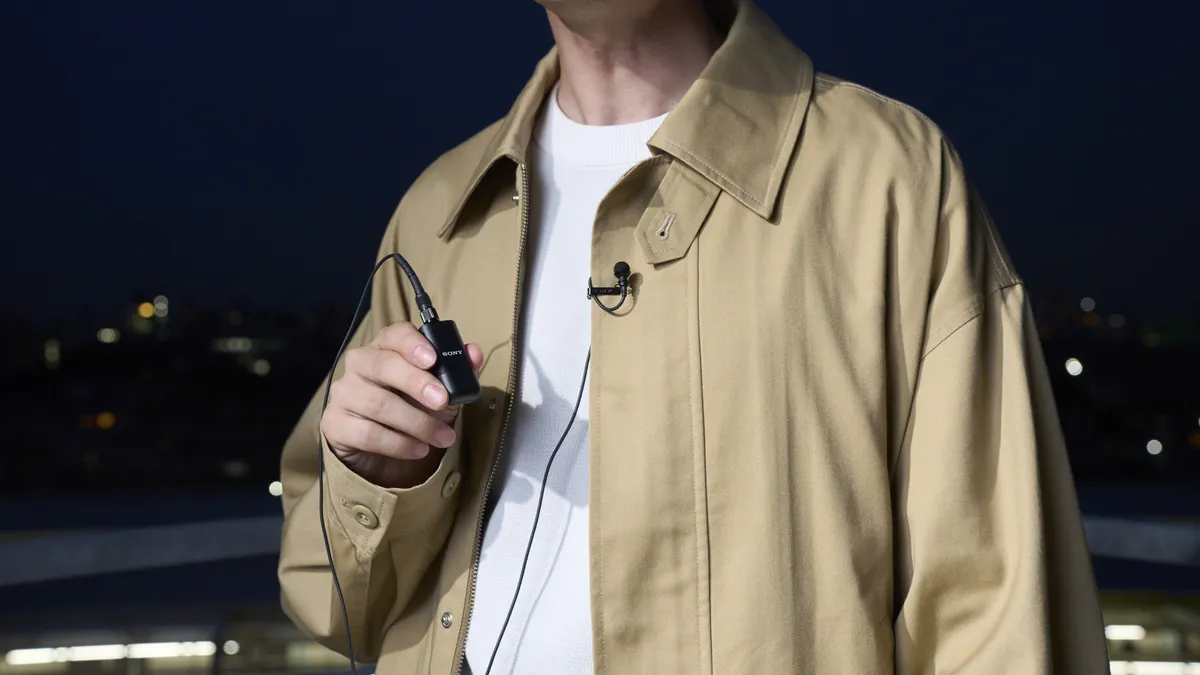
Made with Sony's customary attention to quality, the ECM-L1 is a plug-and-play lav mic that can easily slot into an existing system. You can plug it directly into your camera, or use it with pretty much any wireless transmitter from another system, and it'll offer you excellent audio quality thanks to its ECM-77 series capsule, which is widely used in the pro recording world and is certainly a cut above the capsules you'll see in many cheaper lav mics.
Essentially, this is a mic for anyone who wants to use a lav mic as their principal source of audio recording, and doesn't mind paying for the privilege. I tested the Sony ECM-L1 alongside a RØDE Lavalier II, which can be picked up for about half the price. The Sony unsurprisingly was better, with cleaner, clearer, and richer sound in the lower frequencies – but it wasn't that much better. Pros who want the utmost in audio quality will certainly appreciate the difference, but most content creators will probably be just fine with the cheaper option – and there are many cheaper options out there.
Read our full Sony ECM-L1 review
How to choose the best wireless mic kits
Any of the lavalier mic kits in this buying guide will enable you to improve the audio production values of your videos, but it’s worth considering your specific needs as a filmmaker.
If you want to talk to camera without the constraints of a hard-wired lavalier mic, then consider the cheaper option of buying a version that contains one transmitter mic and a receiver. Most entries in this buying guide feature the more expensive duo version of each kit, which enables you to clip a mic onto yourself and another onto your interviewee so that you both sound loud and clear as you walk and talk wirelessly.
You should also consider whether you want a simple ‘plug and play’ kit that lets you start recording straight away, or whether you want the option of viewing and manually adjusting sound levels on the receiver with a more advanced kit.
On the whole, the more you spend, the more features you’ll get – such as onboard recording. But even the cheapest kit in our guide will sound better than your camera’s built-in mic, especially once you’ve moved a few feet away from your recording device.
How do I connect a receiver to a smartphone?
Some of the wireless lav mics featured in this guide ship with a 3.5 mm TRS jack audio cable that connects the receiver to the 3.5 mm socket on a DSLR or mirrorless camera. They also provide a 3.5 mm TRS-to-TRRS cable for older smartphones with a jack input.
To connect this cable to a smartphone without a 3.5 mm jack socket (such as an iPhone), you’ll need an adapter cable. A 3.5 mm to USB-C adapter will let you connect the receiver to an Android smartphone or an iPhone 15 model or later. If you have an older iPhone, you can buy a 3.5 mm to Lightning connector. Some models ship with connectors for both USB-C and Lightning, so you can plug the receiver directly into your smartphone without a third-party adapter. Adapters are relatively inexpensive.
When you plug the adapter into an iPhone, you may be asked if you’re connecting headphones or another device. Tap “Other Device,” or your iPhone might not recognize (and therefore not receive audio from) the mic.
Fortunately, many of the wireless lav kits featured in this guide include a USB-C receiver that plugs straight into the USB-C port of a smartphone or PC, enabling you to record audio broadcasting from the transmitter with ease.
What does 32-bit float mean?
Some more upmarket transmitters use a 32-bit float to capture their onboard recordings. This is the audio equivalent of shooting a photo in a camera's raw format. Just as a camera raw file contains much more information about a file’s colors and tones, enabling you to restore detail to clipped (overexposed) highlights and restore detail hidden in underexposed shadows, the 32-bit float recorded file contains more information too, enabling you to boost quiet sound levels without adding artifacts such as hiss or capturing a sound voice without it becoming distorted.
How I test the best wireless mics
I test microphones in a number of challenging situations to check how they perform against different background noises. I have tested the microphones in this guide next to a noisy steam engine, near a busy major road, around high-pitched, noisy children, and directly under several flight paths. I assess how cleanly the lavalier microphones pick up speech amidst all this hubbub. If you want to see for yourself how the microphones perform, our full reviews include supporting test videos so you can hear the sound quality directly.
For wireless lavalier mics, I also conduct a distance test. This involves walking away from the camera with its attached receiver while talking continuously. I also turn my back to the camera at various distances to check for signal dropout when the transmitting mic loses line of sight with the receiver.
