







Digital Camera World Verdict
The Bird Buddy Pro Solar Hummingbird Feeder alerted me to the first hummingbirds to visit my backyard this summer – and I was even able to keep an eye on them while traveling. The feeder is thoughtfully designed and easy to clean. The app is smart and simple to use, though it doesn't photograph the birds that don't stay long. I loved using the Bird Buddy hummingbird feeder, but it's pricey and doesn't come with multiple hanging options or an ant moat.
Reasons to buy
- +
Easy to use
- +
Quick to clean
- +
Detailed photos and videos
- +
Works without the optional subscription
- +
Long battery life
Reasons to avoid
- -
Pricey
- -
Only one mounting option
- -
No ant moat
Why you can trust Digital Camera World Our expert reviewers spend hours testing and comparing products and services so you can choose the best for you. Find out how we test.
Nothing quite marks the transition into warmer weather quite like the arrival of migratory birds – and hummingbirds are among my favorites. But as much as I love to watch the speedy birds, I’ve always longed for a close-up look at the buzzing birds that seem barely larger than golf balls. That’s why I decided to try the Bird Buddy Hummingbird Feeder.
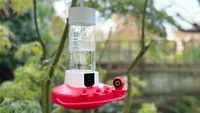
Bird Buddy’s hummingbird setup uses the Nature Cam Pro, which also works in the Bird Buddy Smart Feeder, but houses it in a feeder designed for nectar feeders.
The setup meant I was able to get a notification on my smartphone as soon as the first hummingbirds migrated to my backyard. I was even able to continue birdwatching when I left for vacation (with a pet sitter to keep the sugar water fresh, of course).
Bird Buddy Hummingbird Feeder: Specifications
- Camera: 5 megapixel photos, 2K video on a ⅓” sensor
- Field of View: 122 Degrees
- Detection: Proprietary Sensor
- Audio: Microphone
- Power: 3800 mAh Rechargeable Lithium Ion Battery
- Charging: Included USB-C cable
- Connectivity: 802.11 b/g/n Wifi connection @2.4 GHz plus Bluetooth
- Operating Temperature: -5°F to 120°F / -20.5°C to 48.5°C
- Weather resistant: Yes
- Nectar capacity: 14 fl oz / 1.75 cups
Bird Buddy Hummingbird Feeder: Price
The Bird Buddy Hummingbird Bundle retails for around $299. For birders who already have the Nature Cam Pro from other feeders, Bird Buddy also sells the hummingbird housing without the camera for $99.
Bird Buddy Hummingbird Feeder: Design & Handling

Hummingbird feeders have to have the water changed frequently to avoid spoiling in the summer heat, so one of the things that I was happy to see on the Bird Buddy feeder designed specifically for hummingbirds is that the nectar basin twists easily off the bottom. I can bring the nectar container inside for washing and refilling easily.
The nectar basin is one piece, which makes the corners a bit tougher to scrub out, but it’s fairly easy to clean using a bottle brush. The flower openings can pop off, and the bundle includes a small scrubber to clean these small openings.
Sugar water tends to attract ants, and there's no ant moat built into this hummingbird feeder. However, the hanging style feeder will work with add-on ant moats from other brands, and there are a lot of options under $10.
Once clean and filled with sugar water, the basin twists easily onto the base.
The camera itself is even easier to maintain. The camera plugs into the front of the feeder, and a solar roof helps keep the battery from draining too quickly. I’ve only had to charge the camera once in the month that I’ve been using it. The battery seemed to drain faster when I switched to the higher 2K resolution. The exact battery life may depend on how shaded your backyard is, how often hummingbirds visit, and the camera settings.

setupThe hummingbird feeder is made with what feels like heavy-duty plastic. The set up is also weather-proof and managed to snap some shots of poor, wet hummingbirds in heavy rain.

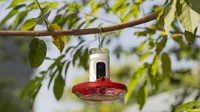
The entire feeder hangs using a metal bar, which makes it easy to mount on existing bird feeder poles and brackets. This does, however, allow the feeder to swing and move around, so it was difficult to keep the camera pointed in the direction that I wanted in order to get trees instead of my house in the background. It would have been nice to have a secondary mount option to attach to a post instead. The seed feeder has this option with an optional accessory.
Bird Buddy Hummingbird Feeder: Performance
Bird Buddy’s hummingbird feeder uses the same Nature Cam Pro that also works in the brand’s seed feeder and bird bath. This camera is capable of video up to 2K and 5MP still images. The camera also has a slow-motion mode, which is quite fun for how quickly hummingbirds move, but the ability to download slow-motion videos is listed as “coming soon.”
The camera also uses a 122-degree lens that captures quite a wide view. The hummingbirds are feeding rather close to the camera, but the lens has impressive close focusing that keeps the birds sharp.

Videos are about a minute long, regardless of how long the bird stays there, but that was sufficient for most hummingbird visits. The videos are vertical, as the hummingbird feeder doesn't, sadly, have an option to turn the camera like the Bird Buddy Pro 2.
The birds up close to the feeder are impressively rendered a majority of the time. The images and video were impressively detailed – I loved seeing the detail in the tiny feathers and even the occasional long tongue sticking out.
Occasionally, the still photos will blur, but the app usually captures several in a series, so I could choose the best one. The camera does have trouble when some of the shots are in the sun, and some are in the shade, occasionally making parts of the bird too bright.

There are some imperfections in the background of the footage, with colored fringing around tree branches and blurred edges. Video footage captured in low light does get quite muddled with noise in the early morning and late evening shots; in one, half of a door in the background was missing due to muddled details.
The Bird Buddy only takes video and photos when a bird is detected (unless you open the app and enter live view mode). I received plenty of notifications throughout the day, but I did see a few birds that the camera didn’t catch – the hummingbirds (and one confused grosbeak) that didn’t stay long didn’t trigger the camera’s recognition system to capture footage. The notifications are quick, but not typically fast enough for me to look out my window and still get to see the bird in person.


I live in an area that only sees one type of hummingbird – the Ruby-Throated – so I wasn’t able to test the species recognition beyond that. But it uses the same camera system in the Smart Feeder that does a good job of recognizing different species.
The Bird Buddy app is free to use without a subscription, but without a subscription, the bird ID isn’t automatic – and the pop-ups to subscribe can get annoying. I had to click a button to ID the bird, which is required before saving any footage to the app’s collections. The subscription also unlocks features like Alexa integration, sound ID, and tallying the visits from individual birds.
Photos and videos were kept for about 6 days before expiring – so any shots worth saving for later should be downloaded within that time frame.
Along with identifying the birds and saving photos and video, there’s a button to “style your photo.” But, this uses AI to do things like dress up the bird in a silly outfit or replace the real bird with an AI generation. While I love the AI bird recognition, the generative AI editing feels like a weird way to add fake birds to a camera that already does a great job of capturing the real thing. I would have preferred more useful, real tools, like the ability to crop or apply filters to adjust colors.
The Bird Buddy app was fairly easy to use, and I was also able to share automatic postcards with my fellow bird-loving family members. At the same time, I love that the camera doesn’t save anything when there are no birds detected. When I pull the camera out to charge, the camera is disabled entirely, which is a nice automatic privacy feature.
Like with security cameras, bird feeder cameras can pepper my phone with a lot of notifications throughout the day. The app does allow “Smart push notifications,” which sends only the most essential updates, but there’s also an option to receive every update and, importantly, the option to pause all notifications. There’s also an off-grid setting to temporarily disable the camera for privacy.
Bird Buddy Hummingbird Feeder: Verdict

The Bird Buddy Pro Solar Hummingbird Feeder was a fun way to watch my smallest backyard birds. The footage is quite detailed, and I loved being able to monitor who visited my feeder even when I wasn’t at home.
Maintenance was fairly straightforward. I would have preferred a two-piece basin for easier cleaning along the edges, but the feeder was still simple to clean. The solar roof also helped keep the battery fresh – I’ve only needed to take it down to charge once in the month that I’ve had it.
The Bird Buddy hummingbird system is fun and easy to use, but I did have a few minor complaints. If the bird doesn’t stay long, the camera doesn’t capture anything, so I missed getting a shot of the Grosebeak that landed on the hummingbird feeder instead of the jelly feeder. The pop-ups asking for a subscription can get annoying, and the generative AI features feel like a waste of energy when the real birds are so much better.
Bird Buddy Hummingbird Feeder: Alternatives
You may also like...
Ready for more backyard bird photos? Browse the best bird feeder cameras, or take a look at the best cameras for wildlife photography.

