Digital Camera World Verdict
The Apexel TeleMacro Pro 10X Kit enables you to get closer to distant subjects, opening up a world of new compositional choices. Its ability to compress distances produces a more cinematic-looking photo (or clip). The tactile manual focal ring enables you to fine-tune focus quickly, and you can even turn the telephoto lens into a mini telescope using the supplied rubber eyepiece, which can help you spot your next subject. The macro lens is also impressive, enabling you to capture small subjects without obscuring them with your iPhone’s shadow. The only grumble I have is with the time it takes to align the kit’s universal smartphone clip with my iPhone’s main camera.
Reasons to buy
- +
Lightweight construction
- +
Compatible with most smartphones
- +
10x optical telephoto and Macro
- +
Opens up new subject choices
Reasons to avoid
- -
Fiddly to align clip mount with smartphone lens
- -
Large circular vignette
- -
Quite an eye-catching accessory
Why you can trust Digital Camera World Our expert reviewers spend hours testing and comparing products and services so you can choose the best for you. Find out how we test.
My current day-to-day smartphone is an iPhone 17, which has a 2x (52mm equivalent) optical zoom. My previous iPhone - the 16 Pro - had a 5x (120mm) optical zoom, and I really miss that extra reach when it comes to street photography. With my older iPhone 16 Pro’s 5x zoom, I could enjoy capturing candid street photos without distracting the subject or photographing distant architectural details. Thanks to the Apexel TeleMacro Pro 10x Kit, I can finally enjoy the versatility of a powerful optical zoom on my iPhone 17 without blowing my budget by purchasing a pro iPhone 17 model.
Founded in 2011, Apexel is a China-based company that specialises in smartphone lenses, and I’ve tested and reviewed a few of their products for Digital Camera World, such as the impressive Apexel 36x Telephoto that uses a powerful optical zoom to capture wildlife at a distance.
At the other end of the zoom spectrum is their smartphone microscope, which enables you to photograph far more detail than your smartphone’s built-in macro lens can see.
As the product’s name indicates, the Apexel TeleMacro Pro 10x Kit provides a 10x optical zoom when aligned with your smartphone’s main 1x camera. The Apexel TeleMacro Pro 10x Kit also ships with a 10x macro lens that screws onto the end of the lens’s metal barrel, enabling you to capture beautiful close-ups of flora and fauna with a very narrow depth of field, producing an attractive abstract bokeh in the foreground and background.

Specifications
Magnification |
10X Telephoto / 10X Macro |
Equivalent focal length |
480mm |
Lens Structure |
9 Elements / 12 Groups |
Glass |
ED Low-Dispersion
|
Focus Distance |
0.2m – Infinity |
Material |
Aircraft-Grade Aluminum |
Distortion |
0% |
Weight |
145g |
Size |
1.26 x 5.51 inch |
Filter Thread |
37mm supported |
Price
The Apexel TeleMacro Pro 10x Kit is reasonably priced at £68.99/$89.98, especially if you want to expand a non-pro iPhone’s telephoto and macro capabilities without forking out hundreds more £/$ for an iPhone Pro model. I tested the version of the kit that ships with a universal clip mount and as you’ll see from this review, I’m not a fan of the universal clip mount as it took a while to align with my iPhone’s lens. Fortunately you can order an iPhone-specific Apexel case alongside the TeleMacro Pro 10x Kit and surprisingly, it won’t cost you anything extra!). Then you can simply screw the lens onto the thread that’s nicely aligned with your iPhone’s main camera. You should only buy the universal clip mount version of the kit if you don’t own an iPhone.
Design & Handling
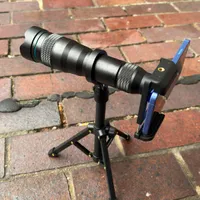
With its long (5.51-inch) metal barrel and clip-mount, you’d expect the Apexel TeleMacro Pro 10x lens to cause your lightweight smartphone to sag a bit, but thankfully that’s not the case. The barrel is constructed of aircraft-grade aluminium, so it only weighs a manageable 145g.
The cold metal lens certainly feels nice and solid, and gives off a sense of being well built. A small rubber lens cap and a rubber protector at the other end of the lens keep the glass component safe when in transit. Talking of glass, the lens itself consists of 12 elements and is coated with a multi-coating designed to reduce glare and reflections.

Midway up the lens is a focus ring, which is easy to rotate thanks to a series of fine grooves that make it easy to get a good grip. The focus distance for the telephoto lens is between 1m and infinity. At the tip of the lens is a thread where you can attach the supplied 10x macro lens.
This small add-on enables you to capture macro images between a focus distance of 20 and 24 cm. The thread also fits the kit’s supplied screw-on adapter ring, enabling you to attach 37mm filters to the lens.

The Apexel TeleMacro Pro 10x Kit and all its accessories ship in a resilient yet compact carry case, which has a cut foam interior that holds everything in place. The case also has a webbed section, which is really handy to hold its small fiddly items, such as the detachable rubber eyepiece that transforms the telephoto lens into a monocular (or mini telescope!). The case is about a handspan in width and length, so it will fit easily into a small camera kitbag.
One thing that the kit is missing is a mini tripod, such as the one that ships with the Apexel 36x telephoto kit. Without a tripod, it’s impossible to shoot steady video using a 10x telephoto lens, as I discovered on my test shoot…
Performance
To test the Apexel TeleMacro Pro 10x Kit, I headed to London’s sunny Southbank district. Jumping off the train at Blackfriars station, I was treated to a stunning panoramic view of various London landmarks, so I immediately decided to start shooting. Because I was using the kit’s supplied universal clip mount (instead of a dedicated Apexel iPhone case), it took me about five minutes to align the clip with my iPhone 17’s main camera.
Once the clip looks aligned, you need to screw the lens into its thread. Invariably, the lens wasn’t perfectly aligned with the iPhone’s camera, so I had to unscrew the plastic screw that keeps the grip attached to the iPhone and fine-tune the lens’s alignment. The effort was worth it, though, as I immediately had a new perspective on a familiar view.

Examples of how the powerful 10x optical zoom of the Apexel TeleMacro Pro 10x Kit compresses the distance between the background.
Image credit: George Cairns / Digital Camera World

Foreground subjects are rendered in a more cinematic look.
Image credit: George Cairns / Digital Camera World
When viewing through the Apexel telephoto lens using my iPhone’s 1x camera, I could see my subject inset into a circular window surrounded by a black vignette. At 10x magnification, distant subjects looked very close, so I could just about fit the dome of St Paul’s Cathedral into the circular field of view.
However, to lose the black circle around the edge of my subject, I needed to tap my iPhone Camera app’s 2x camera icon. This cropped into the frame, losing the circular black vignette but zooming even tighter into the subject. So I could no longer fit the entire Cathedral dome into the shot.

By default, you see a black vignette around the edge of the frame when using the 1x camera.
Image credit: George Cairns / Digital Camera World

You need to crop into the shot using the 2x camera to lose the vignette.
Image credit: George Cairns / Digital Camera World
This extreme cropping can limit your compositional choices, but it also enables you to capture familiar scenes in new ways. I was able to compose a shot that juxtaposed the Millennium Bridge in the bottom of the frame with the far older Tower Bridge in the background.
Due to the powerful 10x zoom, the 1.6 miles between these two bridges was dramatically compressed, so they looked much closer together. This compression of distance gives you a more cinematic look than you’d get using a smartphone’s built-in lenses.

The focal ring enables you to get subjects looking sharp. You can also use it to focus on foreground subjects such as the glass panel.
Image credit: George Cairns / Digital Camera World

Or twist it to focus on the distant girl. This lets you change the subject of your shot without reframing.
Image credit: George Cairns / Digital Camera World
I regretted not bringing a mini tripod to my test shoot, as I would have been able to capture some cinematic-looking video clips. If you plan to shoot video with this lens, then a tripod is essential, as at 10x zoom, every small hand movement is dramatically magnified.
Indeed, although I was only shooting photos, the excessive camera shake made it a challenge to compose shots. Fortunately, it was a sunny day, so the iPhone defaulted to using a super-fast shutter speed. This enabled me to capture great shots of moving subjects, such as a passing police helicopter.
The fast shutter speed meant that these shots were free from motion blur. For a lens under $100, the quality was pretty good, though I did notice a little chromatic aberration towards the edge of the frame in high-contrast subjects.

It took a while to get used to focusing with the Apexel 10x telephoto. I noticed that the iPhone was trying to use auto-focus, which caused it to hunt between foreground and background objects. I solved this issue by locking the iPhone’s focus on the most distant subject and then tweaking the Apexel lens’s focus ring until the subject looked sharp. The iPhone 17’s large and bright display enabled me to adjust focus accurately and effectively for the most part.
I then headed to the busy Borough Market to meet a photographer friend - Shaughn - for lunch. I’d recently been on a street photography shoot with Shaughn in Borough Market using my iPhone 17. Due to its limited telephoto reach, I wasn’t able to capture many candid street photography pictures on that earlier shoot, and I was a bit shy about getting close to my subjects. Thanks to the Apexel 10x telephoto, I was able to camp at the edge of the market and capture documentary-style shots of people from a great distance, without intruding on their lunch break.

My next job was to test the Macro component of the Apexel TeleMacro Pro 10x Kit. When you get close to a subject using the iPhone 17, it automatically switches to Macro mode, using the .5x (13mm) camera. By being close to a subject, you often find that the iPhone’s shadow is obscuring it. The Apexel macro lens has a very narrow focal range of 20 - 24 cm, but it means that you don’t need to be so close to your subject, and the shadow is avoided.

The first shot features a flower shaped using the iPhone 17’s Macro mode.
Image credit: George Cairns / Digital Camera World

We had to get so close using the Apexel TeleMacro that the iPhone’s shadow obscures the subject.
Image credit: George Cairns / Digital Camera World
After attaching the Macro lens to the thread at the end of the barrel, I popped into my garden to try and photograph bees pollinating flowers. With fast-moving subjects such as insects, it’s almost impossible to keep them in focus for long, especially if they are sitting on a wind-blown flower.
There’s no time to pull focus, so you need to move a few centimetres closer or further away from the insect until it is sharp. The trick to capturing a macro image of an insect is to shoot HD slow-motion video at 240 fps. Then, a bee that was only in sharp focus for a second or so is now on screen for much longer, so you can export a sharp frame as a still. Check out my supporting video to see this technique in action.
Verdict
If you’re a smartphone street photographer or a budding member of the paparazzi, then thepexel TeleMacro Pro 10x Kit will give you a close-up candid photo from a great distance. It also compresses distance, enabling you to capture cinematic shots where the foreground subject and the background appear much closer together. I also enjoyed the option to screw on the macro lens and capture small subjects such as bees, flattered by a strong bokeh.
The downside to using this third-party lens accessory was having to fiddle around with aligning the telephoto lens’s universal clip with my iPhone’s camera, but this won’t be an issue if you include an iPhone-specific Apexel case in your order. All in all, I found that the powerful Apexel telephoto’s 10x optical zoom opened up a new world of photography subjects in locations that I’ve been visiting for years, and I had fun shooting superior macro pictures too.
Features ★★★★★ |
The Apexel TeleMacro Pro 10X Kit offers 10x magnification for both telephoto and macro subjects. It also ships with a 37mm filter adaptor. The whole kit fits into a compact but sturdy Apexel branded carry case. |
Design ★★★★★ |
The Apexel TeleMacro Pro 10X Kit’s aircraft-grade aluminium body is solidly built, and the tactile grooved focus ring makes it easy to adjust focus. |
Performance ★★★★☆ |
The lens itself produces great telephoto and macro results once you get it aligned with your smartphone camera. It just took a while to align it with the clip mount. |
Value ★★★★★ |
This is cheap way to upgrade your smartphone’s optical telephoto shooting range. And it enables you to capture better macro shots too. |
Overall |
★★★★½ |
Alternatives