Digital Camera World Verdict
Essentially replacing the Power 500 with one twice as good, it seems DJI has mastered the compact power station for off-gridders, perhaps especially drone pilots and other creatives (for some reason 😉).
Reasons to buy
- +
Lightweight and easy to carry
- +
Easy to use app
- +
Pull-out USB-C cable means you don't need to remember a cable
Reasons to avoid
Why you can trust Digital Camera World Our expert reviewers spend hours testing and comparing products and services so you can choose the best for you. Find out how we test.
We tend to think of portable power stations as big, and power banks as something you can throw in your bag alongside your phone for a few top ups. DJI's Power 1000 Mini sits somewhere between the company's range of bigger battery power stations, but still packs around 1kWh.
Charging is still fast too – the fun retractable USB cable (and the plain old socket – your choice) deliver 100 watts of power, suited for bi-directional fast charging.
That's ideal for creatives – and drone enthusiasts – who might need to carry them some way away from the grid, or even where they parked. It's also handy if you're dabbling your toe into the off-grid world as there is real power here; enough to keep your freezer running in a power outage, for example (there are two AC sockets, and it'll take a charge from an AC cable too).
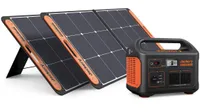
Oh, and if you're really worried about the times to come, or need to top up the charge fully off grid, then the device is solar-panel compatible too.

DJI Power 1000 Mini: Price
The Power 1000 Mini has a UK RRP of £599, or AU$799 (as with all newer DJI products, it remains to be seen if there will be a US version, but of course it'll need US sockets, so this does depend a bit more on DJI).
It's already not a bad price as there is no need to spend more on a solar converter.
DJI Power 1000 Mini: Specs
Storage |
1 kWh |
Output |
1000 W |
Sockets |
USB-C (male) |
Connectivity |
Wi-Fi, Bluetooth |
DJI Power 1000 Mini: Build and Handling
Built from a reassuringly robust plastic with a very luggable handle, unboxing the DJI Power 1000 Mini gave me no initial concerns. All the connectors and the display are located on the front, as well as a light, so you won't need to go looking around the power station to find things – it's either there or it isn't.
On which subject, this is a portable battery with a finite amount of space, but it still packs in two AC sockets, an AC input, 2 USB-Cs (we'll get to that) and 2 USB-A, and one of DJI's SDC ports (which is essentially an XT90 with some extras, and will take an XT90 connector).
This means that, with a very cheap adapter (I found one for under $10), you can also charge standard drones from traditional FPV brands with XT60 connectors, but DJI have a range of cables on offer for its own drones for the fastest possible charging in the field.

A nice new feature is the pull out USB-C charging cable, which means that you can charge almost any modern phone without needing to remember any other bits of wire at all. It is on a sprung coil and guides itself back in when you don't need it any more.

In terms of monitoring the usage, you have both a detailed display and an app. The latter also allows the changing of settings, for example, a low power alarm, limiting the charging speeds, remote switching of the light (including an SOS mode).

The biggest number on the display – the charge percentage – is easily read from a few meters away, which was very useful for me as I could see it inside the house even when the battery & panel was at the back of a London garden.
The app provides more detailed info like a charge time estimate based on current conditions. There are also a full set of useful management features (firmware updating, energy management. There is a low energy alarm, the option to disable fast charge, and the option to limit the maximum charge to preserve battery life, amongst the controls for things like time out. It's all very easy to understand in the DJI Home app and because Wi-Fi and Bluetooth are supported you can get info from nearby, or keep up to date with the charge status when you're much further afield should you choose.

DJI Power 1000 Mini: Performance
There were several things that immediately pleased me about the power station (which, let's face it, is a fancy way of saying "battery"). Charging time was around an hour – 75 minutes even all the way to 100%.
It took rather longer in the UK, where the weather is not predisposed to show me a lot of sunshine without cloud. Using a 200W solar panel, even with the angle about right and better moments, I didn't see much more than 130W flowing in at once, but it did impress me and occasionally checking and adjusting the solar panel wasn't much of a chore.
Charging from the mains electricity via the AC in port is faster, of course, so ideal if you're in a hurry, but if you're worried about any impending doomsdays, then I'd make sure you pick up a solar panel too! How many other content creators will have planned ahead?


DJI Power 1000 Mini: Overall verdict
To keep camera gear or drones topped up with charge on the road, this is a sensible choice, and the ability to plug a single folding solar panel in means – if you're away camping or just in a good flying field – you should be able to more or less charge the whole battery on a sunny day from a typical 200W solar panel, though you'll need to move it a couple of times to keep the efficency up.
The impressively low weight – DJI has sliced over 3Kg from the DJI Power 1000 while only cutting the capacity from 1024Wh to 1008Wh comes at very little real 'cost' – the Max Output is "only" 1000W at any one time, but that'll run a full-size fridge-freezer when the power is out, and your laptop and wi-fi, for example.
I'm less certain why the USB-C is cut to 100W rather than 140W (less, too, than the older Power 1000), but if it's to keep the components smaller and lighter then it seems a reasonable compromise. The benefits of this design – compact, built-in light (controllable via the app if needs be) – comfortably outweigh the minor restrictions of being 'Mini' in my view. If you disagree, DJI has you covered too.
Features ★★★★☆ |
Perhaps I lack imagination, but I can't really think of any more features I'd need, save for an XT60 socket in some niche circumstances, (and the adapter for that is cheap). Space is finite. Between the app and the device, everything else is covered. |
Design ★★★★★ |
The compact size, especially compared to other 1kWh batteries, is very impressive, and other touches (all the sockets on one panel, solid hand grip, and the brilliant retracting lead) all impress. |
Performance ★★★★★ |
The light is a useful tool, but for me what was most impressive was the number power to weight ration. |
Value ★★★★☆ |
Though the price isn't the lowest out there, it's low considering that it is possible to plug in a solar panel. |
Alternatives