





Digital Camera World Verdict
A drone and a pocket gimbal camera is a brilliant idea, and HoverAir's trademark problem-solving design capabilities have brought it to life. Better still, it is consistent in its core purpose – simplicity – while representing good value and practicality.
Reasons to buy
- +
One purchase gets you two new types of shot.
- +
1/1.3 sensor and 10-bit H-log option
- +
AI-tracking shots and hand-landing mean it's quick to learn
Reasons to avoid
- -
Drone's flight range is limited, designed for 'follow-me' nearby shots.
- -
No tripod thread without adding an accessory
Why you can trust Digital Camera World Our expert reviewers spend hours testing and comparing products and services so you can choose the best for you. Find out how we test.
It’s unusual to get a drone without wings or propellers, but then the HoverAir Versa can’t fly on its own - it needs its detachable wings. Without them it is a pocket gimbal camera. Two very cool devices in one!
The market for the pocket gimbal camera was essentially created by DJI, and I remember calling it “like one of their gimbals attached to a handle instead of a drone” HoverAir has taken its own drone tech and made that suggestion optional.
It’s a brilliant idea, but inevitably it raises some questions too: how well attached are the wings (and how easy are they to remove)? Is it practical to have all the components where they should be for drone and camera mode? Would it be easier to have one of each? I took the Versa out to answer exactly that question.

HoverAir Versa: Price
The HoverAir Versa starts at £429 (around $560) for the pocket gimbal camera alone, but far more interesting is the 'FlySmart Bundle' at £519, the cheapest option that includes the detachable (should that be attachable?) wings.
On the face of it that starting price represents good value against the similarly priced DJI Osmo Pocket 4, a single-lens pocket camera without wings (or even the possibility of them), though DJI's device has a larger image sensor.
US prices to come.
HoverAir Versa: Specs
Sensor |
1/1.3-inch |
Video: |
4K60 (10-bit) |
Dynamic range |
17..5 stops (claimed) |
Stills resolution |
4096 × 3072 px |
Weight |
Camera: 163g |

HoverAir Versa: Build & handling
Unboxing the HoverAir versa was a slightly strange experience for someone like me who has reviewed many drone and many gimbal cameras. Here I knew right from the off that the flexibility was key, but I still found myself a bit surprised that I began with a single box, big enough only for the pocket gimbal camera that it contained.
That's because you can buy the device separately if you choose. I can't quite imagine why you would choose (other than if you were saving up for the wings), but that's just me. Let's be fair, I do like drones!

There is very little by way of physical control on the device. The rotating touchscreen is similar to that seen on the competition from DJI and Insta360, but it conceals no additional buttons. Beneath it is a thumb-stick which can also be pressed in with a satisfying click, and the shutter button.
The Versa makes good use of repeat presses of the thumbstick for the most crucial operations, and swiping from the side of the touchscreen to bring up playback, settings and other controls. I was astounded that such a small screen even allowed me to type in a wi-fi password successfully!
In handle mode, rotating the screen acts as the gives you a crucial 2-seconds to opt for vertical shooting or allow it to power down (very much as DJI's device does) and that's ideal.

Attaching the folding wings is simplicity itself. A magnet guides it in, while a reliable physical clip holds them in place. Before you do so, it is essential to slide the cover for the connectors down, but I had no problem with this during my test.
I noticed that in flight, even testing in strong winds, there was no worry about the wings coming off. Once the drone had landed back in my palm (it always waits until there is a hand beneath it to land), it was a matter of simplicity to remove them.

When the wings are attached, the screen above the drone becomes the tool to launch it. Point the camera at yourself, swipe the screen to choose a flight/shot (i.e. orbit), and then press the launch button on the screen.
A multi-colored light in the back of the gimbal switches to red while the camera is recording, and green when it is finished and hovering, waiting for you to put your hand beneath it – when you do it will land on the hand beneath it. The guards protect you from the propellors.
In common with some of HoverAir's other products, there are a lot of optional accessories. I mean I've never met a drone that can only optionally fly, for a start, but there is also the option of a charging hub with slots for two batteries.
There is also a multifunction tripod adapter for the handle which is also the only way to add a tripod thread.

Performance
Video performance struck me as more than adequate, if perhaps not as crisp as I'd have liked. Sadly I might not be able to blame the device, which I've currently only flown in less-than-ideal weather.
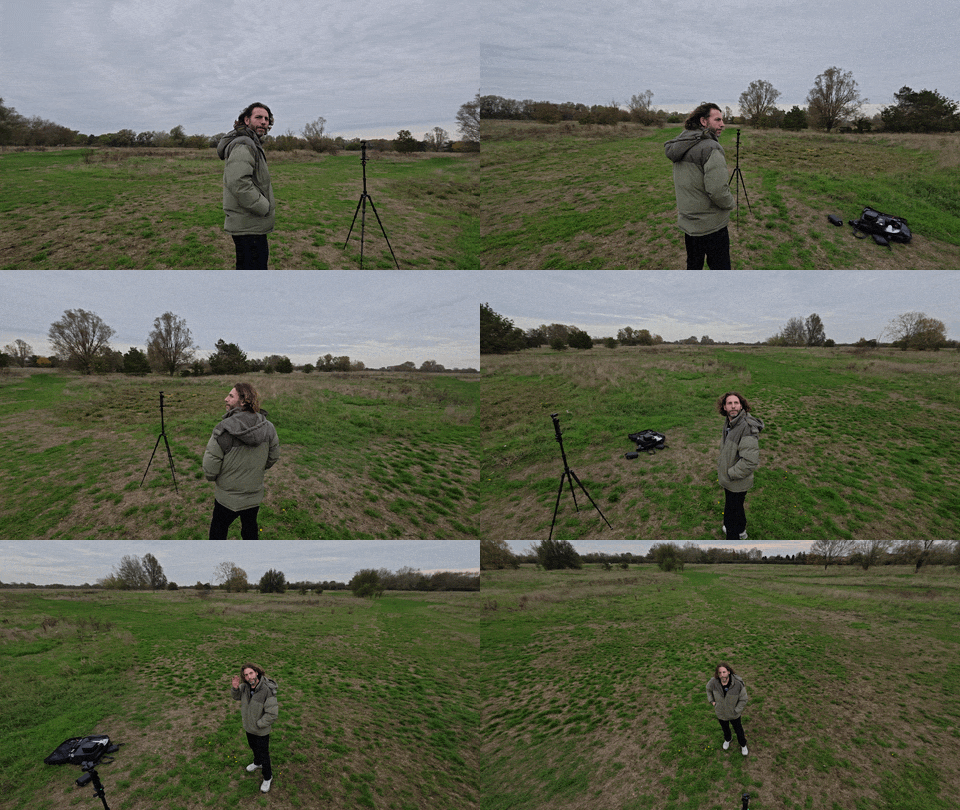
Nonetheless, I was impressed with the quality of both the video and the AI camera's choice of dramatic angles. You can see detail in the light (cloud texture) and dark (my jumper) in the default video, though I think it struggles a bit more in the darker areas than the light. I noticed the same in the photos.
In terms of the AI, the hand-landing was extraordinary. It was completely reliable in my tests. There were a couple of moments I realised I was a little lucky it didn't hit the tripod I'd set up to record a video of myself, but that was on me – there are not collision sensors – not that a drone this light with a safety cage could do a lot of harm.

Pose caught using the AI mode - near


The AI is also used to compose photos, and the camera can also be triggered by gestures (the classic 'V') and all of this seemed broadly reliable in my tests.
I did find the touchscreen a slightly quirky way to launch a drone at first, but to capture a few cool shots it is simple, and swiping through the options on a color screen is definitely better than having to resort to a phone for remote control or reading the name of an obscure flight path with no other indication of what it might mean.
I did also try the app to fly manually within Wi-Fi and that worked well, too.

HoverAir Versa: Overall verdict
The HoverAir Versa is a stunningly successful device. I was prepared to be a little disappointed by the need for compromise but in the end I wasn't. What I found was a cohesive experience that made acquiring dynamic content straightforward. It all goes to one storage location, but you get everything you might need, from a surprisingly good-quality camera.
The other crucial question for me is whether this is it a better buy than a DJI Pocket 3 (which, as the older model, can be had relatively cheaply) AND DJI Neo (same). For about the same money you'd be getting two separate devices, each with advantages and disadvantages compared to the Versa.
The answer to which is the best choice boils down to whether you want to aim for those niches – perhaps a longer-range drone with special features – or you want the convenience of something small, easy to pack, and easy to download from. For a lot of people, especially those preparing social content in a hurry, the HoverAir Versa will be the sensible choice.
Alternatives
Rather than directing you to an alternative product, because there isn't really one. alternative, I'd suggest you check out the best pocket gimbal cameras and the best camera drones or even the best beginner drones.

