



Digital Camera World Verdict
If you are searching for a solid all-rounder, the PD500W might just be the one. Not only does it have sleek looks and excellent audio quality, but it also offers a range of features that reduce desk clutter and cable runs, and can save your session. Onboard recording and storage, 32bit float audio, and a host of app-controlled tools like a compressor and EQ all add up to a microphone that is very well suited for podcasting, streaming, and narration, among others. Plus, it can be wirelessly connected to a computer or mobile device, aiding in its versatility. Having both USB-C and XLR means it will slot into any recording pipeline too.
Reasons to buy
- +
Solid build quality
- +
Excellent vocal reproduction
- +
32 float on board recording
- +
Lots of bundle deals
Reasons to avoid
- -
Unknown longevity
Why you can trust Digital Camera World Our expert reviewers spend hours testing and comparing products and services so you can choose the best for you. Find out how we test.
Choosing the right microphone can be a tricky task, as there are so many options available, but recently a number of manufacturers have added features that really help the decision-making process.
But first, you need to decide which type of microphone you need, based on your use case. If you want to mount it to a camera, then a shotgun type might fit you best, but that would be no good for recording a podcast. Likewise, a wireless mini mic like those from DJI makes a perfect travel and vlogging companion but might not be best suited for capturing ambient audio at a location.
For now, we are going to focus on studio-type mics, ideal for vocal capture, acoustic instruments, podcasts, and voiceover work. For this, you need something dependable, dynamic, and consistent. Maono’s new PD500W hybrid mic is designed to be just that mic, with some useful tools to help it slot into your workflow, as well as to give it the ability to keep up with you as you progress in your audio journey.
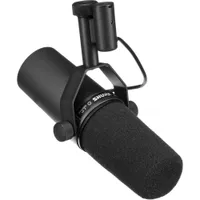
Currently, the king of the hill in this space is the Shure SM7B, which you will find in countless studios, dominating podcasts and YouTube videos everywhere (it’s my daily driver too), and for good reason. It’s dependable, high quality, and just does the job. Maono’s PD500W is attempting a bit of a coup, so I’ve spent some time with it to see if it can deliver the goods, based on a couple of decades of testing all manner of audio gear.
Specification
Type |
Dynamic |
Response |
20hz -20khz |
Power |
USB-C used to charge the internal battery and receiver |
Connection |
USB-C, Wireless, XLR |
Storage |
32GB |
Design
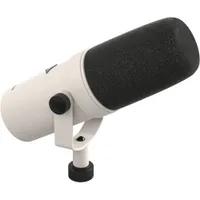
The PD500w is styled in a rather familiar fashion, with a sleek body, the lines of which flow into the windshield, much like the SM7B. The similarities end there, however, as the Maono has a few extra features.
First up is the LED that wraps around the front top half of the body. I’m not usually a fan of lights on mics, which I think gives it the look of a gaming peripheral, but in use it’s useful in this application. It tells you things like charging status, recording, wireless connectivity, and so on, and having used it for some time, I wouldn’t want to go without the at-a-glance information.

On top of the body is an AI noise reduction button, which I’ll talk about more later, next to a rotary encoder, used for gain. This sits a little proud of the surface, making for quick and easy adjustments. The rear of the body is home to a record and a power button. Because yes, the PD500W has an onboard battery, chargeable via a USB-C cable, and 32GB of inbuilt storage.
The mic attaches to a stand via a yoke, which neatly conceals any wiring, keeping things looking clean. The base houses physical connections and offers USB-C for audio and charging, as well as an XLR. There’s also a 3.5mm TRRS port for headphone monitoring. Above these is a wireless receiver that is charged in place and pops off to connect to your phone or computer.
Next to the ports, you’ll find a standard mic stand threaded mount. Mine came with a desk stand, but this can very easily be swapped for whatever solution fits your needs best.

The wireless receiver is small and suits connection to a phone just as well as a computer. I’ve been using it connected to my MacBook Pro. It worked flawlessly but didn’t want to play ball via a USB-C hub. The receiver has a couple of LEDs indicating connection and power, and it paired automatically on first power-up, which is always welcome.

Positioning the Maono is simple, with two friction knobs used to set the angle, and they do a fine job of holding position. It's a pretty lightweight mic too, so using angle poise arms is no issue at all. Plus, the direction of the ports means that cables can be kept neat, with no slack needed.
Overall, the PD500W is a sleek bit of kit and any initial concerns I had faded fast, and I would be very happy to have this in my studio long term, and let’s face it, we do like our gear to look good as well as function well.
The second part of the PD500W is the software. You can, of course treat the mic as a USB-C interface, or connect using an XLR cable directly (either of which works flawlessly), but one of the big draws of this mic is its ability to clear clutter, reduce cable runs, and also use with mobile devices.


With that in mind, I spent a lot of time running wirelessly, and Maono has a software tool you can download from its site, called Maono Link, which gives access to a whole suite of tools and controls, including noise reduction, compressor, and a pop filter. The UI is simple and clean, with tooltips in case you need a helping hand.
Maono Link also shows helpful info like battery status and recording levels, and you can record directly in the app using the built-in storage. What’s more, you can do this in either 24bit or 32bit float and export the audio for use elsewhere.
Performance
Setting up the Maono is a breeze. You would be justified in thinking most microphones are simple, as they are usually plug-and-play. However, the PD500W has a host of features and various connection methods, each of which is really well designed, so you can simply plug it into your interface via XLR.
For me, though, using wireless was intriguing, and I was very pleased with how simple this was. Pop the receiver off the stand and plug it directly into my Mac or iPhone, and a blue LED lit up, denoting the connection status. A press of the power button on the rear of the mic automatically started the pairing, which took a couple of seconds, and green lights showed to confirm.

From that point on, nothing needs to be done. Each time the mic is powered on, it immediately finds the connection, and it hasn’t once dropped out. I tried carrying the mic around to different rooms, and the connection held steady with various wall materials in the way, so if you need to record in one room and control from another, there shouldn’t be any issues whatsoever.
Similarly, a phone connection has great range and stability, inspiring confidence when recording at a distance.
I mentioned the Maono Link software above, which is a great set of tools, and while it is good for recording, I prefer to use Logic or Resolve, as it fits my workflow better. You could record to the internal storage and export, but I like the control of using my main application. That said, I can certainly see where recording to a phone, then exporting the audio and syncing in post, could be helpful, and I love that these options exist.
When it comes to the audio quality, it is really very good indeed. Everything from deep bass to sparkling highs is captured (20hz to 20khz), and it’s a very flat reproduction with slightly pronounced mids, around the 1000-3000hz range. For vocals and acoustic instruments, the results are very pleasing.

I did wonder if some of the onboard features were a bit gimmicky, but in real use they work pretty well. The de-esser and pop filters are surprisingly good, controlling plosives effectively and reducing the need for much processing.
The compressor/limiter also does a good job although I prefer to use my own tools for this but again, nice to have and keeping everything under one roof does streamline production.
Gain can be controlled via the large encoder on the mic, or via Maono Link, and the range is large but easy to find the best level. The pD500W does have auto-balancing too, so if you turn or move your head away from the mic a little, audio levels are adjusted on the fly. Great for podcasters who are excitedly animated!
A note on that big Gain knob. If you give it a press, it switches to headphone level. I really like this feature, as it keeps the physical design clean while allowing access to just what you need. The LED on the mic reflects which mode you’re in too, so quick tweaks on the fly won’t ruin a recording.
The Maono has noise reduction built in too. It’s a little heavy-handed by default for my tastes, but the Link app allows you to choose from three presets, or set a custom level. Something I recommend for your location.
If you dig a little deeper into the app, you can edit preset scenes, which opens up a ten-channel EQ. Tweak this to your liking and then save it as a preset. Great when you record in a variety of scenarios regularly. Again, I usually prefer to EQ in Logic, but this is actually pretty slick and very effective.

I’ve commented in other reviews how nice it is to have 32 bit float recording, as it can really save the day if you badly adjust your settings or place the mic badly. It can’t prevent total disasters, but if you need to bring back a recording that would otherwise have failed, that extra bit depth means you can reduce clipping and level out wildly variable levels with far more ease than if you were using a lower bit depth. In fact, a lot of the time it is the only way to ensure safety.
The Moano’s internal recording is a particularly useful feature, giving a level of backup that could save the day too, a recurring attribute of this mic, but beware. As it stands, you can only export the internal recording to iOS, Windows, and Android. I believe Mac support is in the works, but as it stands, I had to connect to my phone, export, then AirDrop the files to my Mac. Not a big deal, but it did break the otherwise very smooth workflow.
Verdict
My experience using this mic has been a distinctly positive one. I wasn’t expecting to be swayed away from my SM7B, but in reality I feel the Maono is a well-thought-out microphone, with some additional features that really do make production smoother.
Those quality-of-life features make a big difference during recording and post-production, and while there was a small niggle exporting to my Mac, overall I would be very happy using this as my everyday mic of choice. Its slick design looks good, the quality is definitely there, and the layers of protection are truly valuable.
Features ★★★★☆ |
A fantastic dynamic mic with extra features that all serve a purpose and do so very well. |
Design ★★★★☆ |
While LEDs might not be to your tastes the overall design is classic and neat. |
Performance ★★★★★ |
The output of the PD500W is very good and having onboard 32bit float recording is a real boon. |
Value ★★★★★ |
All this for under $400 gets top marks. |
Overall |
★★★★½ |
Alternatives