
The Samsung Galaxy Z Fold8 features a new dual 50MP rear camera setup that pairs the main camera with an ultra-wide camera that captures the same level of detail and resolution across more expansive scenes. There are also front and cover cameras providing versatility for dual recording. Beyond the megapixel count, the combination of multiple lenses with AI-powered software delivers for a wide range of photography situations, from expansive landscapes to intimate portraits and event photography in challenging conditions.
TL;DR
- The Galaxy Z Fold8’s 50 MP ultra-wide camera can capture more of a scene, enabling you to frame expansive landscape shots, dramatic city architecture and up-close macro images.
- Nightography captures crisp, detailed night scenes with vibrant colors in difficult low-light situations.
- The AI Image Signal Processor enhances and refines skin tones and textures, reducing the need for retouching.
- Samsung’s AI-powered Photo Assist makes editing photos and creating new composites as easy as writing text.
- Pairing with a Galaxy Watch9 enables you to operate the camera without touching the phone for handy wireless control.
The 50MP ultra-wide camera fits more into the frame
The Galaxy Z Fold8’s ultra-wide lens sees more of a scene, whether it’s a sweeping natural vista or interesting angles in architecture. This enables you to show the full scale of a location without having to find a different viewpoint further away.
The 50-megapixel resolution is a big jump up from the 12MP sensor on previous generations. What this means in practice is more detail in textures, brickwork, text and foliage, plus uniform image clarity when switching between standard wide and ultra-wide perspectives. It also gives you the ability to crop into photos more closely without sacrificing clarity. This enables you to get more creative with your framing.
The huge 120° field of view is comparable to a 13mm on a full-frame camera. That creates a striking perspective that makes it easier to fit entire buildings or interiors into a picture. Unlike with a traditional camera, AI processing auto-corrects and aligns the image to reduce barrel distortion.
An f/1.9 aperture lets in plenty of light for shooting in gloomy indoor spaces. A close minimum focus distance of around 5cm means you can also use the lens for close-up macro photography, capturing intricate details in small objects, which can be great for product shots.
For dramatic photos with dynamic leading lines, try using the ultra-wide for portraits. Just look for the 0.6mm button on the display to switch lenses.

How do the Galaxy Z Fold8 and Z Fold8 Ultra lenses compare?
| Row 0 - Cell 0 | Samsung Galaxy Z Fold8 |
Samsung Galaxy Z Fold8 Ultra |
Main sensor resolution |
50MP |
200MP |
Ultra-wide resolution |
50MP |
50MP |
Telephoto capability |
None |
10MP telephoto lens |
Zoom range |
Up to 10x digital zoom |
Up to 3x optical and 30x digital zoom |
Front camera |
10MP |
10MP |
Cover camera |
10MP |
10MP |
Best for |
Everyday shots, portraits, macro and wide landscapes |
Capturing wildlife, sports or distant details |
Nightography enables stunning low-light photography
The Galaxy Z Fold8’s AI-powered Nightography technology enables you to capture stunningly vivid late-night scenes without needing a tripod for long exposures by keeping photos crisp and noise-free after dark.
Samsung’s technology makes it easier to achieve photos of street scenes or restaurants at night that look the way you actually experienced them. This has traditionally been a challenge for smartphone photography because the lack of light can lead to blurry, noisy images with muddy-looking color tones.
Nightography is a game-changer for event and concert photography, too, because it responds to the harsh contrast between bright stage lighting and the rest of a scene, avoiding blown highlights.
What does Galaxy Z Fold8 Nightography do?
The Galaxy Z Fold8’s Nightography uses the natural light-gathering capacity of the phone’s wide-aperture lenses and complements that with AI processing powered by the chip’s AI Image Signal Processor (ISP). This tracks and removes the noise patterns produced in low light, while simultaneously sharpening details and enhancing natural color tones to produce photos that could pass for a professionally-lit shot.
The Galaxy Z Fold8’s cameras can detect lighting levels, so Nightography will kick in automatically when needed; there’s no need to fiddle with the settings like you would on a traditional camera. Shooting at night becomes as straightforward as daytime photography.

The Galaxy Z Fold8’s AI Image Signal Processor preserves intricate details with both the cover camera and main camera
AI image processing can automatically enhance natural skin tones and details like hair and textures, reducing or even eliminating the need to retouch an image. The shots are ready to share straight from your phone.
The fact that the ISP now goes to work on both the main camera and the cover camera eliminates the typical quality gap between the two. This enables more seamless switching between the cameras and a huge boost to the quality of selfies.
What does the Galaxy Z Fold8’s AI Image Signal Processor do?
The Galaxy Z Fold8’s ISP is used for various automatic on-device photo enhancements that save you the time it would take to edit photos in post. It enhances low-light images but also images taken in daylight, where it brings out natural textures that camera phone sensors are normally not sensitive enough to capture – like eyelashes, hair strands and fabric patterns.
It also adjusts color dynamically to prevent mixed lighting conditions from creating washed-out or oversaturated skin tones.
Photo Assist makes editing photos faster than ever
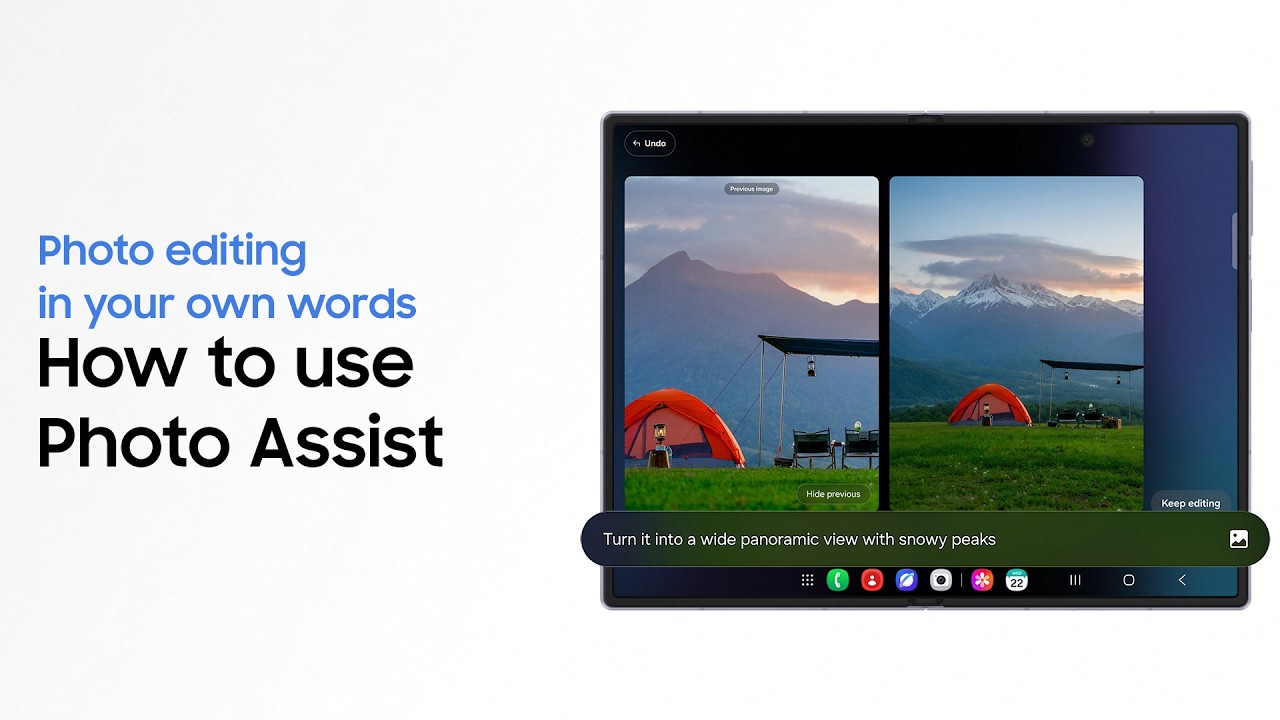
The Galaxy Z Fold8’s Photo Assist enables images to be edited using text prompts, which makes it easy to remove unwanted distractions from photos or create imaginative new compositions without having to use complex software.
You can use Photo Assist to quickly remove objects or photo bombers, to straighten a wonky horizon or to add new imagery. Editing via text makes the tool more intuitive to use compared to traditional manual editing tools.
For professional workflows, it helps you get ahead with your initial cleanup while you’re working in the field before you get down to precise color and contrast adjustments later. Samsung’s Anti-reflecting Film will make it easier to work outside in harsh sunlight.
What can Photo Assist do on the Galaxy Z Fold8?
Photo Assist can be used to make all kinds of edits to a photo, whether you took it on the phone itself or on another device. For convenience, there are four quick-access options. The AI Eraser enables you to select objects to remove, while Move makes it possible to relocate objects and Create enables you to add completely new elements. Finally, Style is the one to choose if you want to transform your image with a novel aesthetic to create a poster or flyer.

Pairing with Galaxy Watch9 allows remote smartphone photography
By pairing the Galaxy Z Fold8 with the Galaxy Watch9, you can operate the phone’s camera without touching the device. This eliminates the need to use a timer for group shots and reduces the chance of camera shake when you press the shutter button.
The watch can display a live feed that enables you to frame shots of yourself, and you can quickly review your photos to see if the shot worked without having to check the phone. This setup can even enable you to photograph shy animals – you can hide out of view and use the watch as a wireless controller, using wrist gestures to switch lenses as needed. Use a tripod and Samsung’s Clear Magnet Case or Silicone Magnet Case to keep the phone in place while you operate it remotely.
If you think the Samsung Galaxy Z Fold8 has the capabilities you want from a camera phone visit the Samsung website to learn more.
FAQs
How good is the dual 50MP camera system on the Samsung Galaxy Z Fold8?
The dual camera system pairs a 50MP main wide camera and a 50MP ultra-wide camera to capture images from macro to portraits in the same high resolution that allows for a 2x crop without losing quality. The large sensors make photos look sharp from edge to edge and capture lots of light and detail for reliable high-dynamic range for high-contrast scenes like sunsets and concerts.
How does the Samsung Galaxy Z Fold8 perform for landscape and ultra-wide photography?
The Galaxy Z Fold8 performs strongly for landscape and ultra-wide photography due to its two 50MP ultra-wide sensors. The bright f/1.9 ultra-wide camera delivers crisp details with minimal edge distortion for sweeping vistas even in dark or high contrast conditions.
Is the Samsung Galaxy Z Fold8 good for taking group photos and portraits?
Yes, the Galaxy Z Fold8 has some major advantages for group photos and portraits. The 50MP ultra-wide lens enables you to take photos of large groups without having to step back so far because the wide field of view fits more into the frame. For group selfies, you can use the camera paired with a Galaxy Watch9 to take the photo remotely without touching the phone.
