<?xml version="1.0" encoding="UTF-8"?>
<rss version="2.0"
	xmlns:content="http://purl.org/rss/1.0/modules/content/"
	xmlns:wfw="http://wellformedweb.org/CommentAPI/"
	xmlns:dc="http://purl.org/dc/elements/1.1/"
	xmlns:atom="http://www.w3.org/2005/Atom"
	xmlns:sy="http://purl.org/rss/1.0/modules/syndication/"
	xmlns:slash="http://purl.org/rss/1.0/modules/slash/"
	>

<channel>
	<title>Digital Camera World &#187; photography cheat sheet</title>
	<atom:link href="http://www.digitalcameraworld.com/tag/photography-cheat-sheet/feed/" rel="self" type="application/rss+xml" />
	<link>http://www.digitalcameraworld.com</link>
	<description></description>
	<lastBuildDate>Sun, 19 May 2013 12:00:31 +0000</lastBuildDate>
	<language>en-US</language>
	<sy:updatePeriod>hourly</sy:updatePeriod>
	<sy:updateFrequency>1</sy:updateFrequency>
	<generator>http://wordpress.org/?v=3.4.2</generator>
		<item>
		<title>Slow shutter speed vs fast: how to maintain a consistent exposure</title>
		<link>http://www.digitalcameraworld.com/2013/05/10/slow-shutter-speed-vs-fast-how-to-maintain-a-consistent-exposure-photography-cheat-sheet/</link>
		<comments>http://www.digitalcameraworld.com/2013/05/10/slow-shutter-speed-vs-fast-how-to-maintain-a-consistent-exposure-photography-cheat-sheet/#comments</comments>
		<pubDate>Fri, 10 May 2013 11:00:18 +0000</pubDate>
		<dc:creator>jmeyer</dc:creator>
				<category><![CDATA[Photography Tips]]></category>
		<category><![CDATA[camera tips]]></category>
		<category><![CDATA[photography cheat sheet]]></category>

		<guid isPermaLink="false">http://www.digitalcameraworld.com/?p=547078</guid>
		<description><![CDATA[How do you choose between a slow shutter speed vs fast shutter speed? In our latest photography cheat sheet we break down all the numbers...]]></description>
			<content:encoded><![CDATA[<p><em>How do you choose between a slow shutter speed vs fast shutter speed? In our latest photography cheat sheet we break down all the numbers&#8230;</em></p>
<p><a href="http://media.digitalcameraworld.com/files/2012/05/How_to_shoot_in_manual_mode_Step-2.jpg" rel="lightbox[547078]"><img class="aligncenter size-full wp-image-538184" title="How to shoot in manual mode: change shutter speed" src="http://media.digitalcameraworld.com/files/2012/05/How_to_shoot_in_manual_mode_Step-2.jpg" alt="How to shoot in manual mode: change shutter speed" width="610" height="406" /></a></p>
<p>As the name suggests, shutter speed sets how quickly – or slowly – the shutter curtains open and close in front of the camera’s sensor. In order to make an exposure, the camera’s sensor needs to be exposed to light.</p>
<p>The size of the aperture (the hole in the lens) determines how much light is let into the camera, while shutter speed dictates how long the sensor is exposed to this light.</p>
<p>The shutter speed can be seen in the bottom of the camera viewfinder and on the LCD screens.</p>
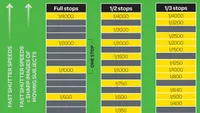
<p>Fast shutter speeds have high numbers, such as 8000, which represent fractions of a second – so 500 means 1/500sec. Lower numbers indicate slower shutter speeds, such as 1.6 ̋ for 1.6 seconds.</p>
<p>To maintain a consistent level of exposure, the shutter speed needs to be balanced with the aperture, and as one is increased, the other needs to decrease.</p>
<p>For instance, smaller apertures (which let less light into the camera) require slower shutter speeds (to expose the sensor for longer).</p>
<p>Wide apertures (more light) need faster shutter speeds (less time) to produce the same exposure.</p>
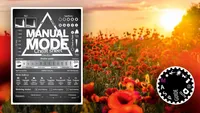
<p>The camera will do this juggling for you when you’re shooting in one of its automatic or semi-automatic shooting modes, but you need to adjust it yourself in Manual mode.</p>
<p>Just bear in mind that the choice of shutter speed is limited by the maximum aperture of the lens.</p>
<p>In our latest photography cheat sheet we explain the difference between fast vs slow shutter speeds… and what all those numbers mean.</p>
<p>Click on the infographic to see the larger version, or drag and drop the cheat sheet to your desktop.</p>
<p style="text-align: center"><a href="http://media.digitalcameraworld.com/files/2013/05/Slow_shutter_speed_vs_fast_photography_cheat_sheet.jpg" rel="lightbox[547078]"><img class="wp-image-547079 aligncenter" title="Slow shutter speed vs fast: how to maintain a consistent exposure (photography cheat sheet)" src="http://media.digitalcameraworld.com/files/2013/05/Slow_shutter_speed_vs_fast_photography_cheat_sheet.jpg" alt="Slow shutter speed vs fast: how to maintain a consistent exposure (photography cheat sheet)" width="480" height="711" /></a></p>
<p><strong>READ MORE</strong></p>
<p><a href="http://www.digitalcameraworld.com/2012/05/29/common-mistakes-at-every-shutter-speed-and-the-best-settings-you-should-use/">Common mistakes at every shutter speed (and the best settings to use)</a><br />
<a href="http://www.digitalcameraworld.com/2012/06/26/best-shutter-speeds-for-every-situation/">Best shutter speeds for every situation</a><br />
<a href="http://www.digitalcameraworld.com/2012/05/29/common-mistakes-at-every-shutter-speed-and-the-best-settings-you-should-use/">Understanding shutter speed as a creative tool</a><br />
<a href="http://www.digitalcameraworld.com/2012/08/10/annoying-problems-at-common-aperture-settings-and-how-to-solve-them/">Annoying problems at common aperture settings (and how to solve them)</a></p>
]]></content:encoded>
			<wfw:commentRss>http://www.digitalcameraworld.com/2013/05/10/slow-shutter-speed-vs-fast-how-to-maintain-a-consistent-exposure-photography-cheat-sheet/feed/</wfw:commentRss>
		<slash:comments>0</slash:comments>
		</item>
		<item>
		<title>Using shutter speed: take control of your shutter for cool, creative effects</title>
		<link>http://www.digitalcameraworld.com/2013/05/03/using-shutter-speed-creatively-how-to-take-control-of-your-shutter-for-cool-effects/</link>
		<comments>http://www.digitalcameraworld.com/2013/05/03/using-shutter-speed-creatively-how-to-take-control-of-your-shutter-for-cool-effects/#comments</comments>
		<pubDate>Fri, 03 May 2013 10:00:37 +0000</pubDate>
		<dc:creator>jmeyer</dc:creator>
				<category><![CDATA[Photography Tips]]></category>
		<category><![CDATA[camera tips]]></category>
		<category><![CDATA[photography cheat sheet]]></category>
		<category><![CDATA[shutter speed]]></category>

		<guid isPermaLink="false">http://www.digitalcameraworld.com/?p=546962</guid>
		<description><![CDATA[In our latest photography cheat sheet we look at some of the different ways of using shutter speed to produce different digital camera effects. ]]></description>
			<content:encoded><![CDATA[<p><em>In our latest <a href="http://www.digitalcameraworld.com/tag/photography-cheat-sheet/">photography cheat sheet</a> we look at some of the different ways of using shutter speed to produce different digital camera effects.</em></p>
<p>With all the focus (no pun intended) these days on <a href="http://www.digitalcameraworld.com/2012/08/13/aperture-vs-depth-of-field-photography-cheat-sheet/">creative controls like aperture and depth of field</a>, it seems like no one ever thinks about shutter speed anymore. But as we all know, shutter speed is an important tool in any photographer&#8217;s repertoire.</p>
<p>Once you learn how to take control of your shutter speed you&#8217;ll open yourself to a host of <a href="http://www.digitalcameraworld.com/tag/creative-photography-ideas/">creative photography ideas</a>.</p>
<p>To help you learn how to master your digital camera&#8217;s shutter speed our latest photography cheat sheet takes you through the basic of how to change your shutter speed settings and how each affects the look of our pictures.</p>
<p>We also show you how to <a href="http://www.digitalcameraworld.com/2012/06/26/best-shutter-speeds-for-every-situation/">identify the best shutter speeds to use for different shooting situations</a> and decide the moments when it is better to go with a fast shutter speed vs a slow shutter speed.</p>
<p>To view the larger version of this photography cheat sheet, click on the infographic to expand the file, or drag and drop it to your desktop.</p>
<p style="text-align: center"><a href="http://media.digitalcameraworld.com/files/2013/05/Using_shutter_speed_photography_cheat_sheet.jpg" rel="lightbox[546962]"><img class="wp-image-546964 aligncenter" title="Using shutter speed creatively: how to take control of your shutter for cool effects" src="http://media.digitalcameraworld.com/files/2013/05/Using_shutter_speed_photography_cheat_sheet.jpg" alt="Using shutter speed creatively: how to take control of your shutter for cool effects" width="252" height="2132" /></a></p>
<p><strong>READ MORE</strong></p>
<p><a href="http://www.digitalcameraworld.com/2012/05/29/common-mistakes-at-every-shutter-speed-and-the-best-settings-you-should-use/">Common mistakes at every shutter speed (and the best settings to use)</a><br />
<a href="http://www.digitalcameraworld.com/2012/11/28/motion-blur-what-shutter-speed-should-you-use-2/">Motion Blur: what shutter speed should you use?</a><br />
<a href="http://www.digitalcameraworld.com/2013/01/31/camera-shake-the-ultimate-cheat-sheet-for-using-tripods-monopods-and-shooting-handheld/">Camera Shake: the ultimate cheat sheet for tripods, monopods and shooting handheld</a><br />
<a href="http://www.digitalcameraworld.com/2013/01/11/photography-basics-the-no-1-cheat-sheet-for-metering-and-exposure/">Photography Basics: the No. 1 cheat sheet for metering and exposure</a></p>
]]></content:encoded>
			<wfw:commentRss>http://www.digitalcameraworld.com/2013/05/03/using-shutter-speed-creatively-how-to-take-control-of-your-shutter-for-cool-effects/feed/</wfw:commentRss>
		<slash:comments>0</slash:comments>
		</item>
		<item>
		<title>6 simple lighting setups for shooting portraits at home (plus free cheat sheet)</title>
		<link>http://www.digitalcameraworld.com/2013/04/03/6-simple-lighting-setups-for-shooting-portraits-at-home-free-photography-cheat-sheet/</link>
		<comments>http://www.digitalcameraworld.com/2013/04/03/6-simple-lighting-setups-for-shooting-portraits-at-home-free-photography-cheat-sheet/#comments</comments>
		<pubDate>Wed, 03 Apr 2013 00:00:34 +0000</pubDate>
		<dc:creator>jmeyer</dc:creator>
				<category><![CDATA[Photography Tips]]></category>
		<category><![CDATA[Portraits]]></category>
		<category><![CDATA[photography cheat sheet]]></category>
		<category><![CDATA[portrait photography]]></category>
		<category><![CDATA[studio lighting]]></category>

		<guid isPermaLink="false">http://www.digitalcameraworld.com/?p=546263</guid>
		<description><![CDATA[If you're looking to take your photography further you'll probably want to learn how to use off-camera flash. In this tutorial we show you 6 simple studio light setups that will help you capture some of the most classic portrait lighting effects. ]]></description>
			<content:encoded><![CDATA[<p><em>If you&#8217;re looking to take your photography further you&#8217;ll probably want to <a href="http://www.digitalcameraworld.com/2012/08/28/the-easy-way-to-set-up-off-camera-flash-for-perfectly-lit-shots/">learn how to use off-camera flash</a>. In this tutorial we show you 6 simple studio light setups that will help you capture some of the <a href="http://www.digitalcameraworld.com/2012/05/08/free-portrait-lighting-cheat-sheet/">classic portrait lighting effects</a>.</em></p>
<p>What&#8217;s more, these <a href="http://www.digitalcameraworld.com/2012/08/29/studio-lighting-4-seriously-simple-lighting-techniques-to-try-at-home/">lighting techniques</a> will provide you with a solid foundation from which you can start experimenting to find your own style.</p>
<p>In our lighting setups cheat sheet below you&#8217;ll learn how to use high contrast light at a 90-degree angle; diffused light and a reflector; high contrast light at 45 degrees; high contrast light at 45 degrees with a reflector; low contrast light at 45 degrees with a reflector; and finally rim lighting from behind.</p>
<h3><strong>Lighting Setup 1: High contrast light at a 90-degree angle</strong></h3>
<p style="text-align: center"><a href="http://media.digitalcameraworld.com/files/2013/04/Studio_lighting_setup_1.jpg" rel="lightbox[546263]"><img class=" wp-image-546266 aligncenter" title="Lighting Setup 1: High contrast light at a 90-degree angle" src="http://media.digitalcameraworld.com/files/2013/04/Studio_lighting_setup_1.jpg" alt="Lighting Setup 1: High contrast light at a 90-degree angle" width="549" height="802" /></a></p>
<p>A striking result achieved with minimal kit. Using a single flash head at this angle can give an unflattering result, though.</p>
<p>The light will show up bumpy skin textures and create stark shadows and bright highlights.</p>
<p>Without a diffuser, the quality of light will be high contrast and if placed near the subject will create problems with fall-off where light is spread unevenly across the face.</p>
<p>By not using a reflector, shadows will be deep.</p>
<p><a href="http://www.digitalcameraworld.com/2013/04/03/6-simple-lighting-setups-for-shooting-portraits-at-home-free-photography-cheat-sheet/"><strong>PAGE 1: Lighting Setup 1- High contrast light at a 90-degree angle</strong></a><br />
<a href="http://www.digitalcameraworld.com/2013/04/03/6-simple-lighting-setups-for-shooting-portraits-at-home-free-photography-cheat-sheet/2/"> <strong> PAGE 2: Lighting Setup 2 &#8211; Diffused light and a reflector</strong></a><br />
<a href="http://www.digitalcameraworld.com/2013/04/03/6-simple-lighting-setups-for-shooting-portraits-at-home-free-photography-cheat-sheet/3/"> <strong> PAGE 3: Lighting Setup 3 &#8211; High contrast light at 45 degree</strong></a><br />
<a href="http://www.digitalcameraworld.com/2013/04/03/6-simple-lighting-setups-for-shooting-portraits-at-home-free-photography-cheat-sheet/4/"> <strong> PAGE 4: Lighting Setup 4 &#8211; High contrast light at 45 degrees with a reflector</strong></a><br />
<a href="http://www.digitalcameraworld.com/2013/04/03/6-simple-lighting-setups-for-shooting-portraits-at-home-free-photography-cheat-sheet/5/"> <strong> PAGE 5: Lighting Setup 5 &#8211; Low contrast light at 45 degrees with a reflector</strong></a><br />
<a href="http://www.digitalcameraworld.com/2013/04/03/6-simple-lighting-setups-for-shooting-portraits-at-home-free-photography-cheat-sheet/6/"> <strong> PAGE 6: Lighting Setup 6 &#8211; Rim lighting from behind</strong></a><br />
<a href="http://www.digitalcameraworld.com/2013/04/03/6-simple-lighting-setups-for-shooting-portraits-at-home-free-photography-cheat-sheet/7/"> <strong> PAGE 7: Download all 6 lighting setups in our free cheat sheet</strong></a></p>
<p><strong>READ MORE</strong></p>
<p><a href="http://www.digitalcameraworld.com/2012/10/31/flash-photography-tips-external-flash-units-anyone-can-understand/">Flash photography tips: external flash techniques anyone can understand</a><br />
<a href="http://www.digitalcameraworld.com/2013/01/07/flash-photography-made-easy-master-everything-from-pop-up-flash-to-multiple-flashguns/">Flash photography made easy: master everything from pop-up flash to multiple flashguns</a><br />
<a href="http://www.digitalcameraworld.com/2013/02/13/best-studio-flash-kits-6-models-tested-and-rated/">Best studio flash kits: 6 models tested and rated</a></p>
]]></content:encoded>
			<wfw:commentRss>http://www.digitalcameraworld.com/2013/04/03/6-simple-lighting-setups-for-shooting-portraits-at-home-free-photography-cheat-sheet/feed/</wfw:commentRss>
		<slash:comments>1</slash:comments>
		</item>
		<item>
		<title>3 advanced studio lighting techniques every portrait photographer should try</title>
		<link>http://www.digitalcameraworld.com/2013/03/18/3-advanced-studio-lighting-techniques-every-portrait-photographer-should-try/</link>
		<comments>http://www.digitalcameraworld.com/2013/03/18/3-advanced-studio-lighting-techniques-every-portrait-photographer-should-try/#comments</comments>
		<pubDate>Mon, 18 Mar 2013 11:47:28 +0000</pubDate>
		<dc:creator>jmeyer</dc:creator>
				<category><![CDATA[Photography Tips]]></category>
		<category><![CDATA[Portraits]]></category>
		<category><![CDATA[home studio photography]]></category>
		<category><![CDATA[photography cheat sheet]]></category>
		<category><![CDATA[portrait photography]]></category>
		<category><![CDATA[studio lighting]]></category>

		<guid isPermaLink="false">http://www.digitalcameraworld.com/?p=545927</guid>
		<description><![CDATA[Want to give your portrait photography a nice blend of subtle and atmospheric effects? These advanced studio lighting techniques using simple two-head lighting set-ups will give you incredible versatility as a portrait photographer.]]></description>
			<content:encoded><![CDATA[<p><em>Want to give your <a href="http://www.digitalcameraworld.com/tag/portrait-photography/">portrait photography</a> a nice blend of subtle and atmospheric effects? These advanced studio lighting techniques using simple two-head lighting set-ups will give you incredible versatility as a portrait photographer.</em></p>
<div id="attachment_545930" class="wp-caption aligncenter" style="width: 559px"><a href="http://media.digitalcameraworld.com/files/2013/03/studio_light_key.jpg" rel="lightbox[545927]"><img class=" wp-image-545930 " title="Advanced studio lighting techniques: key to items on our cheat sheet" src="http://media.digitalcameraworld.com/files/2013/03/studio_light_key.jpg" alt="Advanced studio lighting techniques: key to items on our cheat sheet" width="549" height="194" /></a><p class="wp-caption-text">Use this key to identify the items used in our cheat sheet at the bottom of this page.</p></div>
<p>If you want to give your portraits more of a professional look or simply expand your repertoire as a portrait photographer, you&#8217;ll want to <a href="http://www.digitalcameraworld.com/2012/08/29/studio-lighting-4-seriously-simple-lighting-techniques-to-try-at-home/">start experimenting with studio lighting techniques</a>.</p>
<p>Chances are you&#8217;ve dabbled with flash or tried a simple lighting set-up at home, but if you want to really start taking control of your lighting and drawing out the character of your subject, you&#8217;ll want to broaden your horizons a bit.</p>
<p>Below we&#8217;ve suggested three straightforward studio lighting techniques using two-head lighting set-ups you can use to fine tune your light.</p>
<p>We&#8217;ve also compiled these advanced studio lighting techniques as a <a href="http://www.digitalcameraworld.com/tag/photography-cheat-sheet/">photography cheat sheet</a>, which you can either drag and drop to your desktop or click on directly to view in higher resolution.</p>
<h3>Advanced Studio Lighting Technique No. 1: Add a hair light to lift your subject</h3>
<p style="text-align: center"><a href="http://media.digitalcameraworld.com/files/2013/03/Advanced_studio_lighting_techniques_DCM31.feat_.box2_1.jpg" rel="lightbox[545927]"><img class=" wp-image-545932 aligncenter" title="Advanced Studio Lighting Technique No. 1: Add a hair light to lift your subject" src="http://media.digitalcameraworld.com/files/2013/03/Advanced_studio_lighting_techniques_DCM31.feat_.box2_1.jpg" alt="Advanced Studio Lighting Technique No. 1: Add a hair light to lift your subject" width="366" height="562" /></a></p>
<p>Most studio lighting set-ups only emphsasise one facet of your subject’s face. By adding an additional light to the rear of the set, you can start to create a more three-dimensional effect.</p>
<p>The hair light should be positioned carefully behind your sitter to one side, but not so it shines directly into the lens. Meter this light separately with all others switched off, so that it’s half a stop dimmer than your main light.</p>
<p>Use a snoot to create a small but direct patch of light that picks up the texture of the hair.</p>
<h3>Advanced Studio Lighting Technique No. 2: The Tri-flector technique</h3>
<p style="text-align: center"><a href="http://media.digitalcameraworld.com/files/2013/03/Advanced_studio_lighting_techniques_DCM31.feat_.box2_3.jpg" rel="lightbox[545927]"><img class=" wp-image-545933 aligncenter" title="Advanced Studio Lighting Technique No. 2: The Tri-flector technique" src="http://media.digitalcameraworld.com/files/2013/03/Advanced_studio_lighting_techniques_DCM31.feat_.box2_3.jpg" alt="Advanced Studio Lighting Technique No. 2: The Tri-flector technique" width="366" height="562" /></a></p>
<p>A real innovation in lighting gadgets is the tri-flector. Three mini reflectors are designed into a single unit, which is placed on a low stand underneath your subject.</p>
<p>Each of the panels can move independently to remove shadows from the right, left and underneath, leaving a stark but glamorous result.</p>
<p>Add a single light slightly above the model’s eye level pointing down and you’ll achieve a flawless result every time. Add a hair light behind to emphasise the shape of your sitter.</p>
<h3>Advanced Studio Lighting Technique No. 3: Light the background</h3>
<p style="text-align: center"><a href="http://media.digitalcameraworld.com/files/2013/03/Advanced_studio_lighting_techniques_DCM31.feat_.box2_2.jpg" rel="lightbox[545927]"><img class="wp-image-545934 aligncenter" title="Advanced Studio Lighting Technique No. 3: Light the background" src="http://media.digitalcameraworld.com/files/2013/03/Advanced_studio_lighting_techniques_DCM31.feat_.box2_2.jpg" alt="Advanced Studio Lighting Technique No. 3: Light the background" width="366" height="536" /></a></p>
<p>Most backgrounds serve a secondary purpose and are rarely included in lighting techniques, yet this set-up can give real depth. Assemble your lighting as above, with a second light behind your model out of shot.</p>
<p>Place this low to the ground and fix a snoot or honeycomb to force the light in one direction.</p>
<p>Point the light at the background with the centre of the light exactly behind the centre of your subject’s face.</p>
<p>Meter independently so it’s one stop over your main light reading.</p>
<h3>Download our Advanced Studio Lighting Techniques Cheat Sheet</h3>
<p style="text-align: center"><a href="http://media.digitalcameraworld.com/files/2013/03/Advanced_studio_lighting_techniques_cheat_sheet.jpg" rel="lightbox[545927]"><img class="wp-image-545929 aligncenter" title="3 advanced studio lighting techniques every portrait photographer should try" src="http://media.digitalcameraworld.com/files/2013/03/Advanced_studio_lighting_techniques_cheat_sheet.jpg" alt="3 advanced studio lighting techniques every portrait photographer should try" width="546" height="369" /></a></p>
<p><strong>READ MORE</strong></p>
<p><a href="http://www.digitalcameraworld.com/2012/05/23/master-your-home-photo-studio-setup-settings-accessories-explained/">Master your home photo studio: setup, settings, accessories explained</a><br />
<a href="http://www.digitalcameraworld.com/2013/02/13/best-studio-flash-kits-6-models-tested-and-rated/">Best studio flash kits: 6 models tested and rated</a><br />
<a href="http://www.digitalcameraworld.com/2012/10/31/flash-photography-tips-external-flash-units-anyone-can-understand/">Flash photography tips: external flash techniques anyone can understand</a><br />
<a href="http://www.digitalcameraworld.com/2013/01/07/flash-photography-made-easy-master-everything-from-pop-up-flash-to-multiple-flashguns/">Flash photography made easy: master everything from pop-up flash to multiple flashguns</a></p>
]]></content:encoded>
			<wfw:commentRss>http://www.digitalcameraworld.com/2013/03/18/3-advanced-studio-lighting-techniques-every-portrait-photographer-should-try/feed/</wfw:commentRss>
		<slash:comments>0</slash:comments>
		</item>
		<item>
		<title>Deep Depth of Field vs Shallow: 10 common questions and answers</title>
		<link>http://www.digitalcameraworld.com/2013/03/09/deep-depth-of-field-vs-shallow-10-common-questions-answers/</link>
		<comments>http://www.digitalcameraworld.com/2013/03/09/deep-depth-of-field-vs-shallow-10-common-questions-answers/#comments</comments>
		<pubDate>Sat, 09 Mar 2013 02:00:19 +0000</pubDate>
		<dc:creator>jmeyer</dc:creator>
				<category><![CDATA[Beginner]]></category>
		<category><![CDATA[beginner tips]]></category>
		<category><![CDATA[camera tips]]></category>
		<category><![CDATA[depth of field]]></category>
		<category><![CDATA[photography cheat sheet]]></category>

		<guid isPermaLink="false">http://www.digitalcameraworld.com/?p=545771</guid>
		<description><![CDATA[Ever wondered why some backgrounds are pin-sharp and others are out of focus? This is what's called deep depth of field and shallow depth of field. Find out how to take full control of this in-camera photography effect and answer any lingering questions you may have.]]></description>
			<content:encoded><![CDATA[<p><em>Ever wondered why some backgrounds are pin-sharp and others are out of focus? This is what&#8217;s called deep depth of field and shallow depth of field. Find out how to take full control of this <a href="http://www.digitalcameraworld.com/2012/12/10/forced-perspective-fun-photography-effects-you-can-achieve-with-any-camera/">in-camera photography effect</a> and answer any of the <a href="http://www.digitalcameraworld.com/2013/02/06/15-common-photography-questions-from-beginners-and-how-to-solve-them/">common photography questions</a> you may have.</em></p>
<div id="attachment_545775" class="wp-caption aligncenter" style="width: 388px"><a href="http://media.digitalcameraworld.com/files/2013/03/Deep_depth_of_field_cheat_sheet.jpg" rel="lightbox[545771]"><img class="wp-image-545775 " title="Deep Depth of Field vs Shallow: 10 common questions and jargon-free answers" src="http://media.digitalcameraworld.com/files/2013/03/Deep_depth_of_field_cheat_sheet.jpg" alt="Deep Depth of Field vs Shallow: 10 common questions and jargon-free answers" width="378" height="479" /></a><p class="wp-caption-text">Click on the infographic to see the larger version</p></div>
<h3>Common questions about shallow and deep depth of field (1-5)</h3>
<p><strong>What’s depth of field all about?</strong><br />
Depth of field is a measure of how much of a picture is in focus. A lens can only precisely focus on one plane at a time. However, there’s always a certain amount of the picture in front of, and behind, this plane that also appears to be sharp.</p>
<p>It is this zone of ‘acceptable sharpness’ that is the depth of field. Anything outside of this zone appears blurred or out of focus. The amount of depth of field varies from picture to picture, depending on a number of different factors.</p>
<p><strong>How does knowing this help to improve my shots?</strong><br />
Depth of field is one of the most important creative controls available to the photographer. By learning how to control it, you can ensure that everything from your feet to the horizon appears pin sharp.</p>
<p>Alternatively, you can make sure that depth of field is restricted to such an extent that parts of your picture are thrown anonymously out of focus, for artistic effect or to hide distracting features in a scene.</p>
<p><strong>So what’s the dark secret, then?</strong><br />
It’s not just one factor that affects the amount of depth of field that you end up with, but several working in tandem. Some of these factors, however, are much easier for photographers to control than the others.</p>
<p><strong>What’s the easiest way  to control depth of field?</strong><br />
The aperture setting you use is the simplest and most straightforward way of altering depth of field because you can do this without changing equipment or shooting position.</p>
<p>The smaller the aperture you set, the more depth of field you get and the more of your shot appears in focus. So on a typical zoom, a narrow aperture of f/22 will keep more of the shot in focus than a wider aperture of f/5.6.</p>
<p>The aperture can easily be altered by the photographer in a number of exposure modes, including Shutter Priority and Aperture Priority.</p>
<p><strong>So I can set the depth of field precisely for every shot?</strong><br />
Yes and no. You can increase and decrease the amount of depth of field by adjusting the aperture. However, you don’t always have a free choice, because changing the aperture will affect the shutter speed, and some shutter speeds will not suit every situation.</p>
<p>Slow shutter speeds will cause moving subjects to appear blurred, for instance, or will create visible camera shake. More importantly, you only have a limited range of apertures, so often you can’t set the zone of sharpness precisely to suit your needs. But using the other factors can give you more control…</p>
<p><a href="http://www.digitalcameraworld.com/2013/03/09/deep-depth-of-field-vs-shallow-10-common-questions-answers/"><strong>PAGE 1: Common questions about shallow and deep depth of field (1-5)</strong></a><br />
<a href="http://www.digitalcameraworld.com/2013/03/09/deep-depth-of-field-vs-shallow-10-common-questions-answers/2/"> <strong>PAGE 2: Common questions about shallow and deep depth of field (6-10)</strong></a><br />
<a href="http://www.digitalcameraworld.com/2013/03/09/deep-depth-of-field-vs-shallow-10-common-questions-answers/3/"> <strong>PAGE 3: Learning the lingo around depth of field</strong></a></p>
<p><strong>READ MORE</strong></p>
<p><a href="http://www.digitalcameraworld.com/2012/05/04/99-common-photography-problems-and-how-to-solve-them/">99 common photography problems (and how to solve them) </a><br />
<a href="http://www.digitalcameraworld.com/2012/10/10/dof-defined-controlling-depth-of-field-in-photography/">DoF Defined: controlling depth of field in photography</a><br />
<a href="http://www.digitalcameraworld.com/2012/12/17/photography-basics-how-to-add-depth-to-your-photos/">Photography Basics: how to add depth to your photos</a></p>
]]></content:encoded>
			<wfw:commentRss>http://www.digitalcameraworld.com/2013/03/09/deep-depth-of-field-vs-shallow-10-common-questions-answers/feed/</wfw:commentRss>
		<slash:comments>1</slash:comments>
		</item>
		<item>
		<title>Camera Filters: the only cheat sheet you&#8217;ll need for beautiful, balanced exposures</title>
		<link>http://www.digitalcameraworld.com/2013/02/28/camera-filters-the-only-cheat-sheet-youll-ever-need-to-get-beautifully-balanced-exposures/</link>
		<comments>http://www.digitalcameraworld.com/2013/02/28/camera-filters-the-only-cheat-sheet-youll-ever-need-to-get-beautifully-balanced-exposures/#comments</comments>
		<pubDate>Thu, 28 Feb 2013 12:41:51 +0000</pubDate>
		<dc:creator>jmeyer</dc:creator>
				<category><![CDATA[Landscape]]></category>
		<category><![CDATA[Photography Tips]]></category>
		<category><![CDATA[camera filters]]></category>
		<category><![CDATA[hot]]></category>
		<category><![CDATA[photography cheat sheet]]></category>

		<guid isPermaLink="false">http://www.digitalcameraworld.com/?p=545591</guid>
		<description><![CDATA[Camera filters can be a bit of an enigma for many photographers, both new and experienced. In our new cheat sheet we've produced a handy cheat sheet that takes you four of the most common problem areas for photographers when it comes to using camera filters.

Our flow chart shows you how to choose the best ND grad filter; how to get perfect exposures with a solid ND filter; the secret to using a circular polariser and troubleshooting the common problems with camera filters.]]></description>
			<content:encoded><![CDATA[<p>Camera filters can be a bit of an enigma for many photographers, both new and experienced.</p>
<p>There are many types of camera filters, for starters, and knowing when and how to use them isn&#8217;t always so clear-cut.</p>
<h3>Why use camera filters?</h3>
<p>Different camera filters, especially circular polarizers and <a href="http://www.digitalcameraworld.com/2012/07/05/how-and-when-to-use-nd-filters-and-what-the-numbers-mean/">Neutral Density filters</a>, can dramatically reduce the amount of light that enters the lens, and this will have a profound effect on the exposure setting.</p>
<p>The good news is that your digital camera&#8217;s internal light metering system &#8211; which measures light &#8216;through the lens&#8217; &#8211; will automatically correct for camera filters in the vast majority of cases.</p>
<p>However, a little fine-tuning is often needed, so it&#8217;s best to review shots on your camera&#8217;s LCD screen, <a href="http://www.digitalcameraworld.com/2012/05/10/what-is-exposure-compensation-free-cheat-sheet/">dial-in any Exposure Compensation </a>required, then re-shoot your subject.</p>
<p>In our infographic below we&#8217;ve produced a handy cheat sheet that takes you four of the <a href="http://www.digitalcameraworld.com/2012/05/04/99-common-photography-problems-and-how-to-solve-them/">most common problem areas for photographers</a> when it comes to using camera filters.</p>
<p>Our flow chart will show you how to choose the best ND grad filter; how to get perfect exposures with a solid ND filter; the secret to using a circular polariser and troubleshooting the common problems with camera filters.</p>
<p>To view the larger version of this cheat sheet, simply click on the infographic or drag and drop it to your desktop.</p>
<p>And don&#8217;t miss pages 2 and 3 of this article, where we discuss the camera filter options available to you and the old question of do you go with square or round filters?</p>
<p style="text-align: center"><a href="http://media.digitalcameraworld.com/files/2013/02/Camera_filters_cheat_sheet1.jpg" rel="lightbox[545591]"><img class="wp-image-545647 aligncenter" title="Camera FIlters: the only cheat sheet you'll ever need for beautiful, balanced exposures" src="http://media.digitalcameraworld.com/files/2013/02/Camera_filters_cheat_sheet1.jpg" alt="Camera FIlters: the only cheat sheet you'll ever need for beautiful, balanced exposures" width="230" height="2673" /></a></p>
<p><a href="http://www.digitalcameraworld.com/2013/02/28/camera-filters-the-only-cheat-sheet-youll-ever-need-to-get-beautifully-balanced-exposures/"><strong>PAGE 1: Using camera filters effectively &#8211; free cheat sheet</strong></a><br />
<a href="http://www.digitalcameraworld.com/2013/02/28/camera-filters-the-only-cheat-sheet-youll-ever-need-to-get-beautifully-balanced-exposures/2/"> <strong>PAGE 2: Camera filter options</strong></a><br />
<a href="http://www.digitalcameraworld.com/2013/02/28/camera-filters-the-only-cheat-sheet-youll-ever-need-to-get-beautifully-balanced-exposures/3/"> <strong>PAGE 3: Square vs Round camera filters</strong></a></p>
<p><strong>READ MORE</strong></p>
<p><a href="http://www.digitalcameraworld.com/2012/11/30/camera-filters-which-type-is-right-for-you/">Camera filters: which type is right for you?</a><br />
<a href="http://www.digitalcameraworld.com/2013/02/18/best-graduated-neutral-density-filters-6-models-tested-and-rated/">Best graduated neutral density filters: 6 models tested and rated</a><br />
<a href="http://www.digitalcameraworld.com/2012/09/28/10-tips-for-using-your-10-stop-nd-filter/">10 tips for using your 10-stop ND filter</a></p>
]]></content:encoded>
			<wfw:commentRss>http://www.digitalcameraworld.com/2013/02/28/camera-filters-the-only-cheat-sheet-youll-ever-need-to-get-beautifully-balanced-exposures/feed/</wfw:commentRss>
		<slash:comments>5</slash:comments>
		</item>
		<item>
		<title>DIY Photography Hacks: simple studio lights at Ikea prices!</title>
		<link>http://www.digitalcameraworld.com/2013/02/21/diy-photography-hacks-simple-studio-lights-at-ikea-prices/</link>
		<comments>http://www.digitalcameraworld.com/2013/02/21/diy-photography-hacks-simple-studio-lights-at-ikea-prices/#comments</comments>
		<pubDate>Thu, 21 Feb 2013 12:02:24 +0000</pubDate>
		<dc:creator>jmeyer</dc:creator>
				<category><![CDATA[Photography Tips]]></category>
		<category><![CDATA[Portraits]]></category>
		<category><![CDATA[DIY photography]]></category>
		<category><![CDATA[home studio photography]]></category>
		<category><![CDATA[photography cheat sheet]]></category>
		<category><![CDATA[portrait photography]]></category>
		<category><![CDATA[studio lighting]]></category>

		<guid isPermaLink="false">http://www.digitalcameraworld.com/?p=545433</guid>
		<description><![CDATA[You don't need to spend a fortune on studio lights. It's possible to shoot professional-looking portraits using a common household lamp like the kind you'd buy at Ikea. In this latest DIY Photography Hacks post we'll show you how a simple, single lamp can create a range of dramatic effects in your portrait photography.]]></description>
			<content:encoded><![CDATA[<p><em>You don&#8217;t need to <a href="http://www.digitalcameraworld.com/2013/02/13/best-studio-flash-kits-6-models-tested-and-rated/">spend a fortune on studio lights</a>. It&#8217;s possible to <a href="http://www.digitalcameraworld.com/2013/01/04/professional-photographer-to-the-rescue-family-portrait-ideas-youll-treasure-forever/">shoot professional-looking portraits</a> using a common household lamp like the kind you&#8217;d buy at Ikea. In this latest <a href="http://www.digitalcameraworld.com/tag/diy-photography/">DIY Photography Hacks</a> post we&#8217;ll show you how a simple, single lamp can create a range of dramatic effects in your portrait photography.</em></p>
<p><a href="http://media.digitalcameraworld.com/files/2013/02/DIY_photography_hacks_studio_lights_DCM103.supp_indoor.lamp_FEAT.jpg" rel="lightbox[545433]"><img class="aligncenter size-full wp-image-545436" title="DIY Photography Hacks: simple studio lights at Ikea prices!" src="http://media.digitalcameraworld.com/files/2013/02/DIY_photography_hacks_studio_lights_DCM103.supp_indoor.lamp_FEAT.jpg" alt="DIY Photography Hacks: simple studio lights at Ikea prices!" width="610" height="407" /></a></p>
<h3>How to use your DIY studio lights</h3>
<p>Don’t want to cough up for studio lights for your indoor portraits? You don’t always need expensive studio lighting to shoot professional-looking portraits. In fact, you can take striking shots at home with just a regular household angle-poise lamp.</p>
<p>Place your model in front of a piece of light-absorbing black velvet to create a rich black background. Note that you don’t need a support stand – we suspended ours from a bookcase!</p>
<p>Make sure your subject is sitting comfortably, then place your lamp slightly above and to the right of their head. Other positions can be used to create different lighting effects, but this set-up will give you a flattering, classic result.</p>
<p><a href="http://media.digitalcameraworld.com/files/2013/02/DIY_photography_hacks_studio_lights_DCM103.supp_indoor.lamp_.jpg" rel="lightbox[545433]"><img class="alignleft  wp-image-545437" title="How to use your DIY studio lights" src="http://media.digitalcameraworld.com/files/2013/02/DIY_photography_hacks_studio_lights_DCM103.supp_indoor.lamp_.jpg" alt="How to use your DIY studio lights" width="256" height="384" /></a></p>
<p>Keep your shutter speed relatively fast (we shot at 1/160 sec at f/2.8, ISO500). It’s always best to use a tripod to eliminate camera shake and get the sharpest shots you can.</p>
<p>We used an 80-200mm f/2.8 lens set to 145mm, because this longer focal length created a more flattering portrait.</p>
<p>The halogen bulb can confuse your camera’s auto white balance setting, so switch it to manual to ensure you get a clean skin tone.</p>
<p>Remember not to position your lamp too close to the portrait sitter – it’ll be harsh and directional. This can be a good creative device, but it’s rarely flattering.</p>
<p>Take some test shots and then, when you’re happy with your exposure and general set-up, start shooting. Make sure you build up a rapport with your subject before experimenting with different poses and expressions.</p>
<p><a href="http://www.digitalcameraworld.com/2013/02/21/diy-photography-hacks-simple-studio-lights-at-ikea-prices/"><strong>PAGE 1: How to use your DIY studio lights</strong></a><br />
<a href="http://www.digitalcameraworld.com/2013/02/21/diy-photography-hacks-simple-studio-lights-at-ikea-prices/2/"><strong>PAGE 2: Experiment with a single light source the DIY photography way</strong></a><br />
<a href="http://www.digitalcameraworld.com/2013/02/21/diy-photography-hacks-simple-studio-lights-at-ikea-prices/3/"><strong>PAGE 3: Try using a candle</strong></a></p>
<p><strong>READ MORE</strong></p>
<p><a href="http://www.digitalcameraworld.com/2012/05/02/54-portrait-ideas-free-downloadable-posing-guide/">54 Portrait Ideas: free downloadable posing guide</a><br />
<a href="http://www.digitalcameraworld.com/2012/04/19/free-family-portrait-photography-cheat-sheet/">Free family portrait photography cheat sheet</a><br />
<a href="http://www.digitalcameraworld.com/2012/08/29/studio-lighting-4-seriously-simple-lighting-techniques-to-try-at-home/">Studio Lighting: 4 seriously simple lighting techniques to try at home</a></p>
]]></content:encoded>
			<wfw:commentRss>http://www.digitalcameraworld.com/2013/02/21/diy-photography-hacks-simple-studio-lights-at-ikea-prices/feed/</wfw:commentRss>
		<slash:comments>1</slash:comments>
		</item>
		<item>
		<title>Nikon ViewNX 2: a guide to raw editing in Nikon&#8217;s all-in-one photo editing software</title>
		<link>http://www.digitalcameraworld.com/2013/02/19/nikon-viewnx-2-a-guide-to-raw-editing-in-nikons-all-in-one-photo-editing-software/</link>
		<comments>http://www.digitalcameraworld.com/2013/02/19/nikon-viewnx-2-a-guide-to-raw-editing-in-nikons-all-in-one-photo-editing-software/#comments</comments>
		<pubDate>Tue, 19 Feb 2013 01:00:47 +0000</pubDate>
		<dc:creator>jmeyer</dc:creator>
				<category><![CDATA[Tutorials]]></category>
		<category><![CDATA[photography cheat sheet]]></category>
		<category><![CDATA[raw format]]></category>
		<category><![CDATA[Raw Tuesday]]></category>

		<guid isPermaLink="false">http://www.digitalcameraworld.com/?p=545393</guid>
		<description><![CDATA[In this Nikon ViewNX 2 tutorial we'll show you how to use ViewNX 2 to non-destructively improve the colour, tone, and exposure of a raw file. We'll also show you a cheat sheet guide to the Nikon ViewNX 2 interface, highlighting its key areas.]]></description>
			<content:encoded><![CDATA[<p><em>In this Nikon ViewNX 2 tutorial we&#8217;ll show you how to use ViewNX 2 to non-destructively improve the colour, tone, and exposure of a <a href="http://www.digitalcameraworld.com/tag/raw-format/">raw format file</a>. We&#8217;ll also show you a <a href="http://www.digitalcameraworld.com/tag/photography-cheat-sheet/">cheat sheet guide</a> to the Nikon ViewNX 2 interface, highlighting its key areas.<br />
</em></p>
<p><a href="http://www.nphotomag.com/files/2013/02/Nikon_ViewNX_2_raw_editing_tutorial_NIK16.nikopedia_3.tone_after.jpg" rel="lightbox[545393]"><img class="aligncenter size-full wp-image-3205" title="Nikon ViewNX 2: raw processing made easy" src="http://www.nphotomag.com/files/2013/02/Nikon_ViewNX_2_raw_editing_tutorial_NIK16.nikopedia_3.tone_after.jpg" alt="Nikon ViewNX 2: raw processing made easy" width="610" height="458" /></a></p>
<p>By shooting in the uncompressed raw format you’re doing yourself a big favour, because each raw file is crammed full of extra information about a scene’s colours and tones when compared with a compressed and pre-processed JPEG.</p>
<p>Some of the scene’s colour and tonal information is missing in a JPEG, so you run the risk of adding ugly compression artefacts when editing the file.</p>
<div id="attachment_3206" class="wp-caption aligncenter" style="width: 310px"><a href="http://www.nphotomag.com/files/2013/02/Nikon_ViewNX_2_raw_editing_tutorial_NIK16.nikopedia_3.tone_before.jpg" rel="lightbox[545393]"><img class="size-medium wp-image-3206 " title="Our original shot" src="http://www.nphotomag.com/files/2013/02/Nikon_ViewNX_2_raw_editing_tutorial_NIK16.nikopedia_3.tone_before-300x225.jpg" alt="Our original shot" width="300" height="225" /></a><p class="wp-caption-text">Our original shot</p></div>
<p>The raw format enables you to produce better-looking shots thanks to ViewNX 2’s image-editing tools. Indeed, if you’re editing in the JPEG format then you’ll lack access to the extra image-processing tools and sliders that are only available to raw users, such as White Balance, Exposure Compensation and Picture Control.</p>
<p>The ViewNX 2 program that you get free with your Nikon DSLR is quite a basic package, so it makes sense to use all of its colour and tone-tweaking controls by shooting in raw format.</p>
<p>In this tutorial we’ll show you how to how to reveal detail in high-contrast RAW shots by selectively targeting and adjusting shadows and highlights. We’ll also show you how to claw back missing highlight detail in overexposed photos.</p>
<h3>The Nikon ViewNX 2 interface: key points to know</h3>
<p>To view the larger version of this cheat sheet, click on the infographic or drag and drop it to your desktop.</p>
<p style="text-align: center"><a href="http://www.nphotomag.com/files/2013/02/Nikon_ViewNX_2_interface.jpg" rel="lightbox[545393]"><img class="wp-image-3198 aligncenter" title="The Nikon ViewNX 2 interface: key points to know" src="http://www.nphotomag.com/files/2013/02/Nikon_ViewNX_2_interface.jpg" alt="The Nikon ViewNX 2 interface: key points to know" width="648" height="398" /></a></p>
<p><a href="http://www.digitalcameraworld.com/2013/02/19/nikon-viewnx-2-a-guide-to-raw-editing-in-nikons-all-in-one-photo-editing-software/"><strong>PAGE 1: Key points to know on the Nikon ViewNX 2 interface</strong></a><br />
<a href="http://www.digitalcameraworld.com/2013/02/19/nikon-viewnx-2-a-guide-to-raw-editing-in-nikons-all-in-one-photo-editing-software/2/"> <strong>PAGE 2: Step by step how to process raw files using Nikon ViewNX 2</strong></a></p>
<p><strong>READ MORE</strong></p>
<p><a href="http://www.digitalcameraworld.com/2012/12/11/3-selective-adjustment-tools-your-raw-files-cant-live-without/">3 selective adjustment tools your raw files can&#8217;t live without</a><br />
<a href="http://www.digitalcameraworld.com/2012/08/07/raw-tuesday-how-to-convert-raw-files/">How to convert raw files</a><br />
<a href="http://www.digitalcameraworld.com/2012/10/09/raw-editing-what-you-need-to-know-about-white-balance-correction/">Raw Editing: what you need to know about white balance correction</a></p>
]]></content:encoded>
			<wfw:commentRss>http://www.digitalcameraworld.com/2013/02/19/nikon-viewnx-2-a-guide-to-raw-editing-in-nikons-all-in-one-photo-editing-software/feed/</wfw:commentRss>
		<slash:comments>0</slash:comments>
		</item>
		<item>
		<title>DSLR Lenses: 7 questions photographers must ask about their next piece of glass</title>
		<link>http://www.digitalcameraworld.com/2013/02/15/dslr-lenses-7-questions-photographers-must-ask-about-their-next-piece-of-glass/</link>
		<comments>http://www.digitalcameraworld.com/2013/02/15/dslr-lenses-7-questions-photographers-must-ask-about-their-next-piece-of-glass/#comments</comments>
		<pubDate>Fri, 15 Feb 2013 11:30:32 +0000</pubDate>
		<dc:creator>jmeyer</dc:creator>
				<category><![CDATA[Photography Tips]]></category>
		<category><![CDATA[buying guide]]></category>
		<category><![CDATA[hot]]></category>
		<category><![CDATA[lenses]]></category>
		<category><![CDATA[photography cheat sheet]]></category>

		<guid isPermaLink="false">http://www.digitalcameraworld.com/?p=545275</guid>
		<description><![CDATA[Choosing new DSLR lenses can be a bit of a minefield. To help you with your choice we've (asked and) answered 7 of the most important questions you need to know about your next optic.]]></description>
			<content:encoded><![CDATA[<p><em>Choosing new DSLR lenses can be a bit of a minefield. To help you with your choice we&#8217;ve (asked and) answered 7 of the most important questions you need to know about your next optic.</em></p>
<p style="text-align: center"><a href="http://media.digitalcameraworld.com/files/2013/02/DSLR_lenses_photography_cheat_sheet_DCM135.shoot_basics.lens_anno_02.jpg" rel="lightbox[545275]"><img class=" wp-image-545277 aligncenter" title="DSLR Lenses: 7 questions photographers must ask about their next piece of glass" src="http://media.digitalcameraworld.com/files/2013/02/DSLR_lenses_photography_cheat_sheet_DCM135.shoot_basics.lens_anno_02.jpg" alt="DSLR Lenses: 7 questions photographers must ask about their next piece of glass" width="427" height="643" /></a></p>
<p><strong>I’m using the zoom lens that came with my camera, but I’d like to add one or two more. Where do I start?</strong></p>
<p>Lenses can be split into three basic types: wide-angle, standard and telephoto. The zoom lens that came with your camera offers a focal length in the region of 18-55mm, giving a wide view at the 18mm end and a standard-ish view at the other – depending on the camera it’s attached to.</p>
<p>A good tip for choosing which new lens(es) to go for is to avoid duplicating your existing focal length range where possible. Take a look at lenses that offer either a wider or longer focal length, depending on the type of things you mainly take pictures of.</p>
<p>But do upgrade your kit lens as soon as you can afford to. It’s been built down to a price so that it can be bundled with cameras, and doesn’t feature the sharpest or brightest glass around.</p>
<p><strong>You’ve mentioned focal length three times. That’s how long a lens is, isn’t it?</strong></p>
<p>Not exactly, but without getting caught up in the magic of physics, think of it this way: focal length has an effect on how much of a scene you can see through the lens. Wide-angle lenses have short focal lengths (such as 10mm) and a wide-angle of view – hence the name.</p>
<p>Some of the widest lenses available can take in almost a 180° view of the scene, and with a lens this extreme you need to make sure you don’t accidentally include your own shoes in the frame.</p>
<p><a href="http://www.digitalcameraworld.com/2012/09/07/what-is-focal-length-definition-comparison-every-question-answered/">As the focal length of the lens increases, this viewing angle decreases</a>, to the point where long telephoto lenses of 400mm and above only take in a very narrow view of a few degrees.</p>
<p><strong>OK, so how does a standard lens fit in?</strong></p>
<p><a href="http://www.digitalcameraworld.com/2012/03/29/infographic-full-frame-vs-crop-factor-lenses/">A standard lens for a full-frame digital SLR is 50mm</a>, and it captures roughly the same view as the human eye. However, the smaller ‘APS-C’-sized sensor inside the majority of DSLRs is around 1.5x or 1.6x smaller than a full-frame one.</p>
<p>Subjects appear bigger in the picture, a bit like if you’d cropped a shot in Photoshop, and to get a similar result with a <a href="http://www.digitalcameraworld.com/2012/02/07/full-frame-dslr-do-you-really-need-one/">full-frame DSLR</a> you’d need to use a longer lens.</p>
<p>So, a 50mm lens fitted to a regular SLR actually gives you a ‘full-frame equivalent’ focal length of 75mm (50mm x 1.5).</p>
<p>To get the standard angle of view that a 50mm lens gives you on a full-frame DSLR, you need to use a 35mm lens on most other cameras (35mm x 1.5 = 52.5mm).</p>
<p><strong>Nice maths. So, what’s the point of a standard lens?</strong></p>
<p>Pictures produced by standard lenses have a natural quality that lets a viewer concentrate on the subject of the photo. A 50mm prime – the ‘nifty fifty’ – is a great value all-round lens, ideal for portraits, street photography, still lifes and more.</p>
<p><strong>What do you mean by ‘prime’ lens?</strong></p>
<p><a href="http://www.digitalcameraworld.com/2012/05/12/9-things-you-should-know-about-using-prime-lenses/">Primes are lenses with a single, fixed focal length</a> – such as 24mm, 80mm and 100mm – and the only way to make the subject bigger or smaller in the frame is by using your feet.</p>
<p>Zoom lenses are more convenient as they cover a range of focal lengths. However, you often pay for that convenience with increased weight and compromised optics – primes generally produce sharper pictures and have faster maximum apertures.</p>
<p>Some of the more extreme focal lengths – such as thumping <a href="http://www.digitalcameraworld.com/2013/01/29/nikon-800mm-lens-gets-official-price-are-you-sitting-down/">great 800mm telephoto lenses</a> – are only available in prime lenses, too.</p>
<p><strong>So when should I use a telephoto?</strong></p>
<p>Long telephoto lenses are the mainstay of sports and wildlife photographers, as they can’t get close enough to their subject, yet still need to fill the frame, and telephotos enable them to do just that.</p>
<p>Short ones start with a focal length of around 85mm, with long ones stretching to 800mm and beyond.</p>
<p>These big guns are able to produce an effect called ‘compression’, where objects look closer together in the frame than they actually are.</p>
<p>This effect can be put to great use when composing a scene with ‘stacked’ elements – such as a line of colourful boats in a harbour. Telephotos are also fantastic for picking out details in a wider scene.</p>
<p><strong>Do I need a wide-angle lens if my kit lens starts at 18mm?</strong></p>
<p>On most DSLRs, that 18-55mm kit lenses actually give you the equivalent view of a 27mm-82.55mm lens on a full-frame camera. To get a true ultra-wide view, you’ll have to look at lenses in the region of 10mm.</p>
<p>These lenses show heavy distortion at the edges of the frame, and subjects closer to the lens will seem much larger than distant ones. Compose your shot to embrace (or avoid) these effects.</p>
<p><a href="http://www.digitalcameraworld.com/2013/02/15/dslr-lenses-7-questions-photographers-must-ask-about-their-next-piece-of-glass/"><strong>PAGE 1: Common questions about choosing DSLR lenses</strong></a><br />
<a href="http://www.digitalcameraworld.com/2013/02/15/dslr-lenses-7-questions-photographers-must-ask-about-their-next-piece-of-glass/2/"> <strong>PAGE 2: How to buy a second-hand DSLR lens &#8211; free cheat sheet</strong></a><br />
<a href="http://www.digitalcameraworld.com/2013/02/15/dslr-lenses-7-questions-photographers-must-ask-about-their-next-piece-of-glass/3/"> <strong>PAGE 3: Getting the best from your DSLR lenses</strong></a></p>
<p><strong>READ MORE</strong></p>
<p><a href="http://www.digitalcameraworld.com/2012/04/02/do-or-di-your-lens-markings-explained">DO or Di? Your lens markings explained</a><br />
<a href="http://www.digitalcameraworld.com/2012/06/26/test-your-lens-sharpness/">Test your lens&#8217; sharpness</a><br />
<a href="http://www.digitalcameraworld.com/2012/07/03/9-things-to-know-about-using-a-super-telephoto-lens/">9 things you need to know about using super-telephoto lenses</a><br />
<a href="http://www.digitalcameraworld.com/2012/11/21/full-frame-sensor-size-explained-how-to-exploit-its-advantages-and-cool-effects/">Full frame sensor size explained: how to exploit its advantages and cool effects</a></p>
]]></content:encoded>
			<wfw:commentRss>http://www.digitalcameraworld.com/2013/02/15/dslr-lenses-7-questions-photographers-must-ask-about-their-next-piece-of-glass/feed/</wfw:commentRss>
		<slash:comments>0</slash:comments>
		</item>
		<item>
		<title>DxO Optics Pro 8 review: is this the perfect Photoshop alternative?</title>
		<link>http://www.digitalcameraworld.com/2013/02/11/dxo-optics-pro-8-review-is-this-the-perfect-photoshop-alternative/</link>
		<comments>http://www.digitalcameraworld.com/2013/02/11/dxo-optics-pro-8-review-is-this-the-perfect-photoshop-alternative/#comments</comments>
		<pubDate>Mon, 11 Feb 2013 11:00:13 +0000</pubDate>
		<dc:creator>jmeyer</dc:creator>
				<category><![CDATA[Accessories]]></category>
		<category><![CDATA[Reviews]]></category>
		<category><![CDATA[DxO Optics Pro]]></category>
		<category><![CDATA[photo editing]]></category>
		<category><![CDATA[photography cheat sheet]]></category>

		<guid isPermaLink="false">http://www.digitalcameraworld.com/?p=545181</guid>
		<description><![CDATA[In our DxO Optics Pro 8 review we weigh the pros and cons of this photo editing software to determine if it's the perfect Photoshop alternative for photographers.]]></description>
			<content:encoded><![CDATA[<p><em>In our DxO Optics Pro 8 review we weigh the pros and cons of this photo editing software to determine if it&#8217;s the perfect Photoshop alternative for photographers.</em></p>
<p><a href="http://media.digitalcameraworld.com/files/2013/02/DxO_Optics_Pro_8_review_photo_editing_DCM134.kit_group.lb_dxo_screen.jpg" rel="lightbox[545181]"><img class="aligncenter size-full wp-image-545185" title="DxO Optics Pro 8 review: is the perfect Photoshop alternative?" src="http://media.digitalcameraworld.com/files/2013/02/DxO_Optics_Pro_8_review_photo_editing_DCM134.kit_group.lb_dxo_screen.jpg" alt="DxO Optics Pro 8 review: is the perfect Photoshop alternative?" width="610" height="488" /></a></p>
<h3>DxO Optics Pro 8 Review: what&#8217;s new</h3>
<p>DxO Optics Pro is more of an image-enhancer than an image-manipulator.  It’s designed to take the imperfect images captured by your camera and your lenses, correct their faults and make them as technically perfect as possible.</p>
<p>It’s all based on hard science, using custom-made correction profiles for thousands of camera-lens combinations.</p>
<p>These are tested by parent company DxO Labs, which also makes its testing processes and equipment available to other companies – Digital Camera World uses DxO equipment for its camera and lens tests, for example.</p>
<p>DxO Optics Pro identifies the camera and lens using the EXIF shooting information embedded in the file, then loads the appropriate correction profile automatically, or prompts you to download one.</p>
<p>It doesn’t support every possible camera and lens combination, but it’s rare to find a mainstream camera-lens combination that’s not on the list.</p>
<p>The software then automatically corrects a range of lens faults, including chromatic aberration (colour fringing), distortion (barrel and pincushion), corner shading (vignetting) and edge softness.</p>
<p>You can also manually correct perspective distortion and anamorphous distortion, where objects are distorted at the edges of wide-angle shots.</p>
<p><a href="http://www.digitalcameraworld.com/2013/02/11/dxo-optics-pro-8-review-is-this-the-perfect-photoshop-alternative/"><strong>PAGE 1: DxO Optics Pro 8 Review &#8211; what&#8217;s new</strong></a><br />
<a href="http://www.digitalcameraworld.com/2013/02/11/dxo-optics-pro-8-review-is-this-the-perfect-photoshop-alternative/2/"> <strong>PAGE 2: DxO Optics Pro 8 Review &#8211; performance</strong></a><br />
<a href="http://www.digitalcameraworld.com/2013/02/11/dxo-optics-pro-8-review-is-this-the-perfect-photoshop-alternative/3/"> <strong>PAGE 3: DxO Optics Pro 8 Review &#8211; the interface in detail</strong></a><br />
<a href="http://www.digitalcameraworld.com/2013/02/11/dxo-optics-pro-8-review-is-this-the-perfect-photoshop-alternative/4/"> <strong>PAGE 4: DxO Optics Pro 8 Review &#8211; how it scores</strong></a></p>
<p><strong>READ MORE</strong></p>
<p><a href="http://www.digitalcameraworld.com/2013/01/28/apple-aperture-3-4-3-review/">Apple Aperture 3.4.3 review</a><br />
<a href="http://www.digitalcameraworld.com/2012/12/12/adobe-photoshop-elements-11-review/">Adobe Photoshop Elements 11 Review</a><br />
<a href="http://www.digitalcameraworld.com/2013/01/12/adobe-lightroom-4-review/">Adobe Lightroom 4 Review </a></p>
]]></content:encoded>
			<wfw:commentRss>http://www.digitalcameraworld.com/2013/02/11/dxo-optics-pro-8-review-is-this-the-perfect-photoshop-alternative/feed/</wfw:commentRss>
		<slash:comments>3</slash:comments>
		</item>
	</channel>
</rss>